
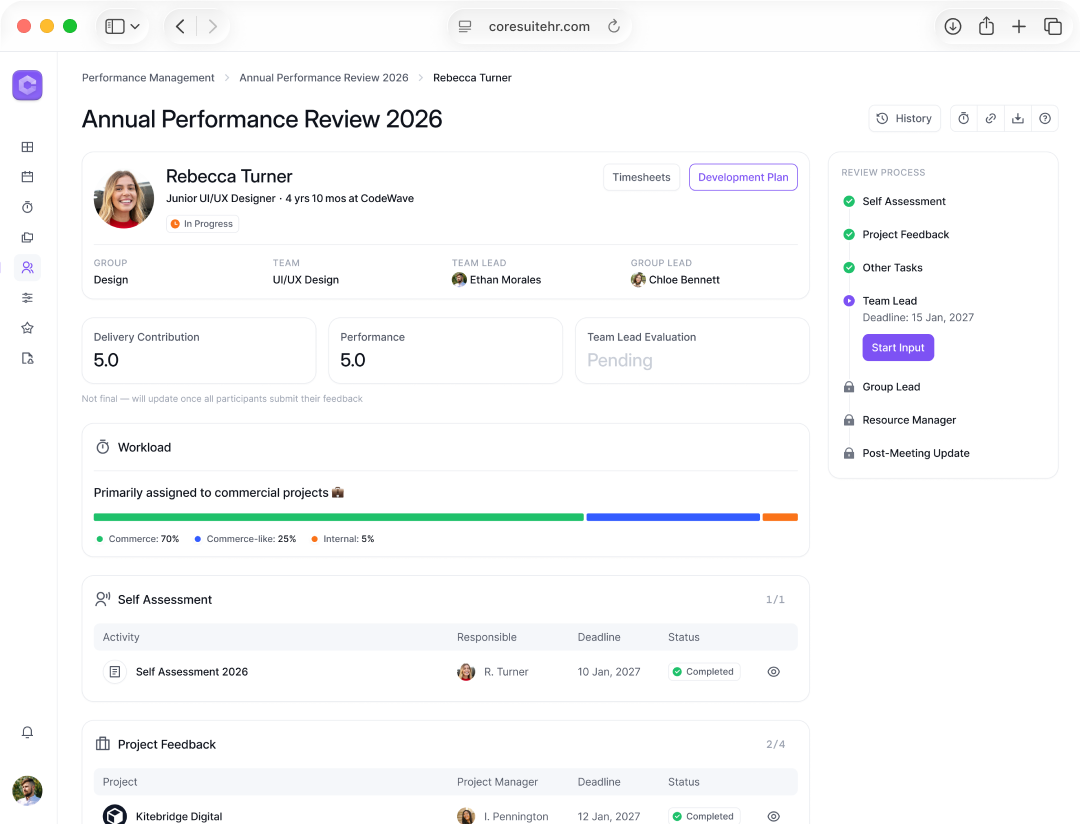
Performance Reviews: from Docs and Slack to a role-based workflow
HR Tech SaaS UX/UI Case Study 15–20 min read
Domain
HR Tech, Performance Management, Internal Tools
Technology
Web App SaaS, Role-based access, Data tables, Dashboards
My Role
UX/UI Designer
Timeline
6 months, 2025–2026
Deliverables
- UX hypotheses
- Role-based workflow
- Information architecture
- Wireframes
- Interactive prototype
- Usability testing
- Final mockups + handoff to dev
- Tools: Figma, Whimsical, Jira, Confluence, ChatGPT
The Team
1 × Stakeholder
1 × Business Analyst
1 × Product Manager
2 × Front-end Developers
2 × Back-end Developers
Overview
Context
An IT company runs annual performance reviews to track employee results and effectiveness
Problem
Performance reviews lived in Google Docs. The process was slow and not transparent — progress and employee history weren’t visible in one place
Expected Result
Design a Performance Review module with a role-based workflow, progress tracking, evaluation forms, and one employee review history page
Outcomes
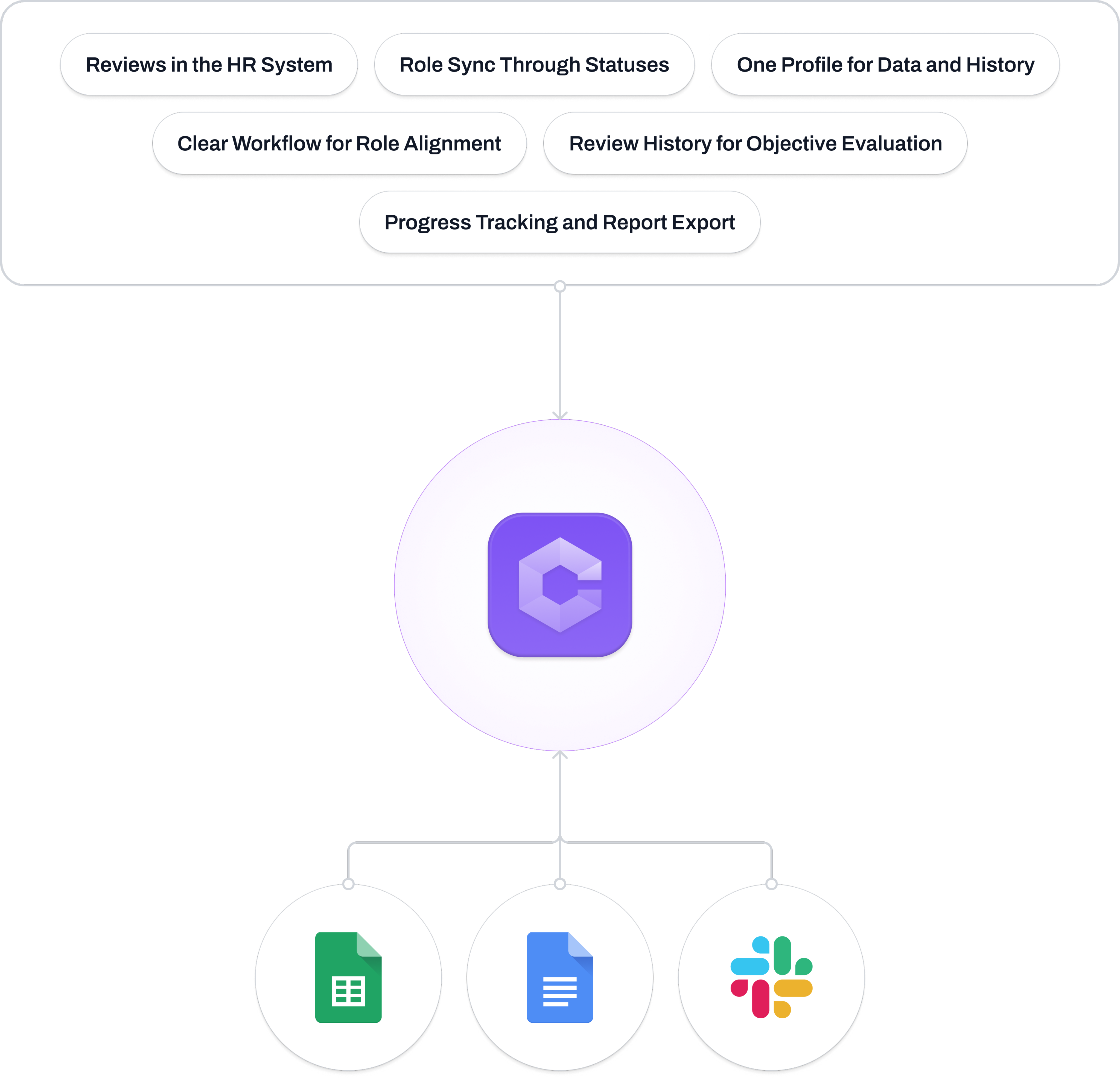
- Clear review progress: status, progress, next step in one view
- One employee page: year context and past review history in one place
- Leadership dashboard: team progress and report exports
- Pilot tested with 4 users to simplify and structure the flow
Problem Statement
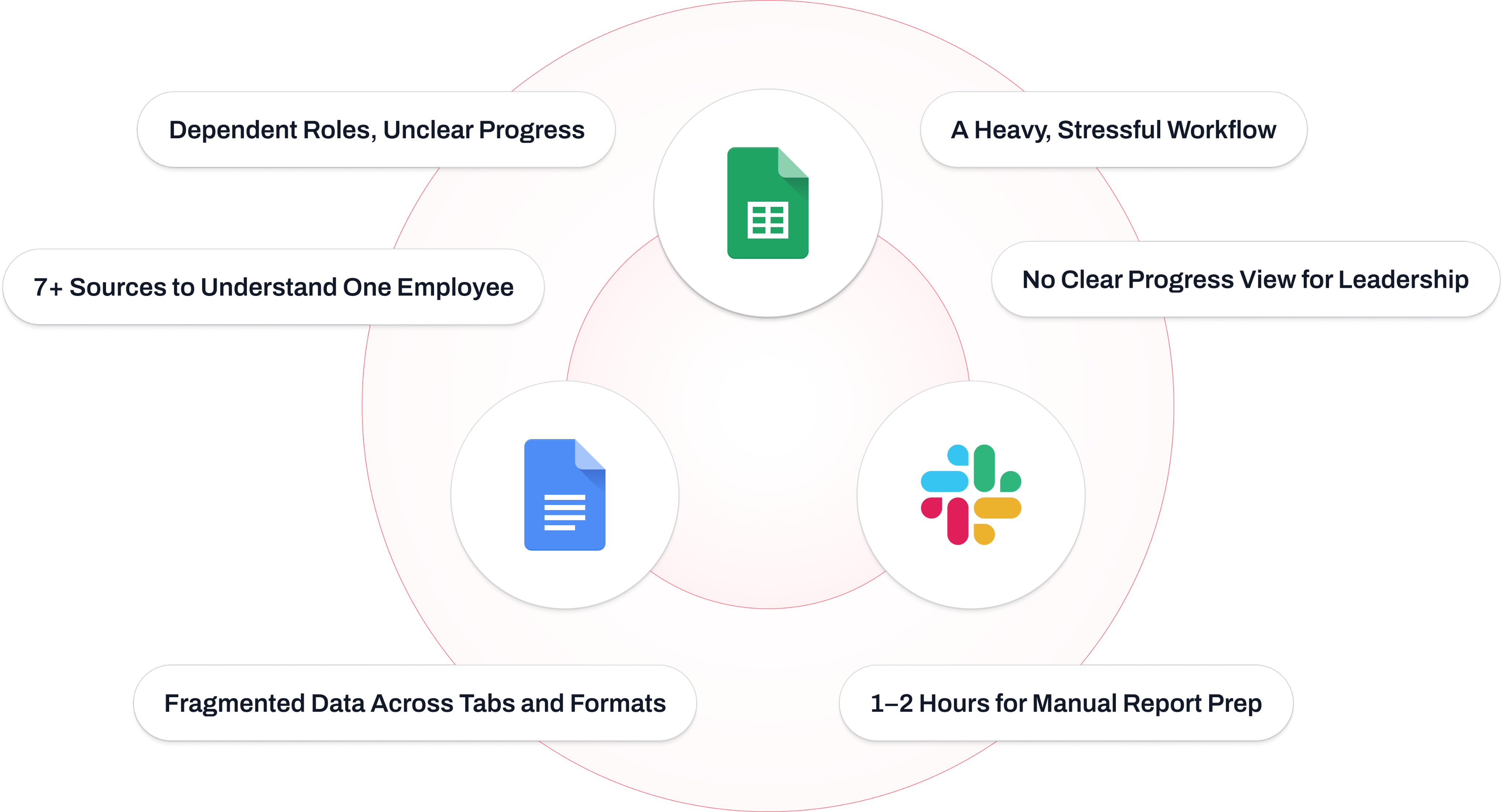
Performance Reviews in Google Docs and Slack: A Slow Process with No Statuses or Employee History
Expected Outcome
Make Performance Reviews Transparent and Reduce User Load
My Process

Stakeholder Alignment Session
Goals, roles, constraints, and success metrics
Process Analysis & Benchmarking
Identified pain points, requirements, and ideas
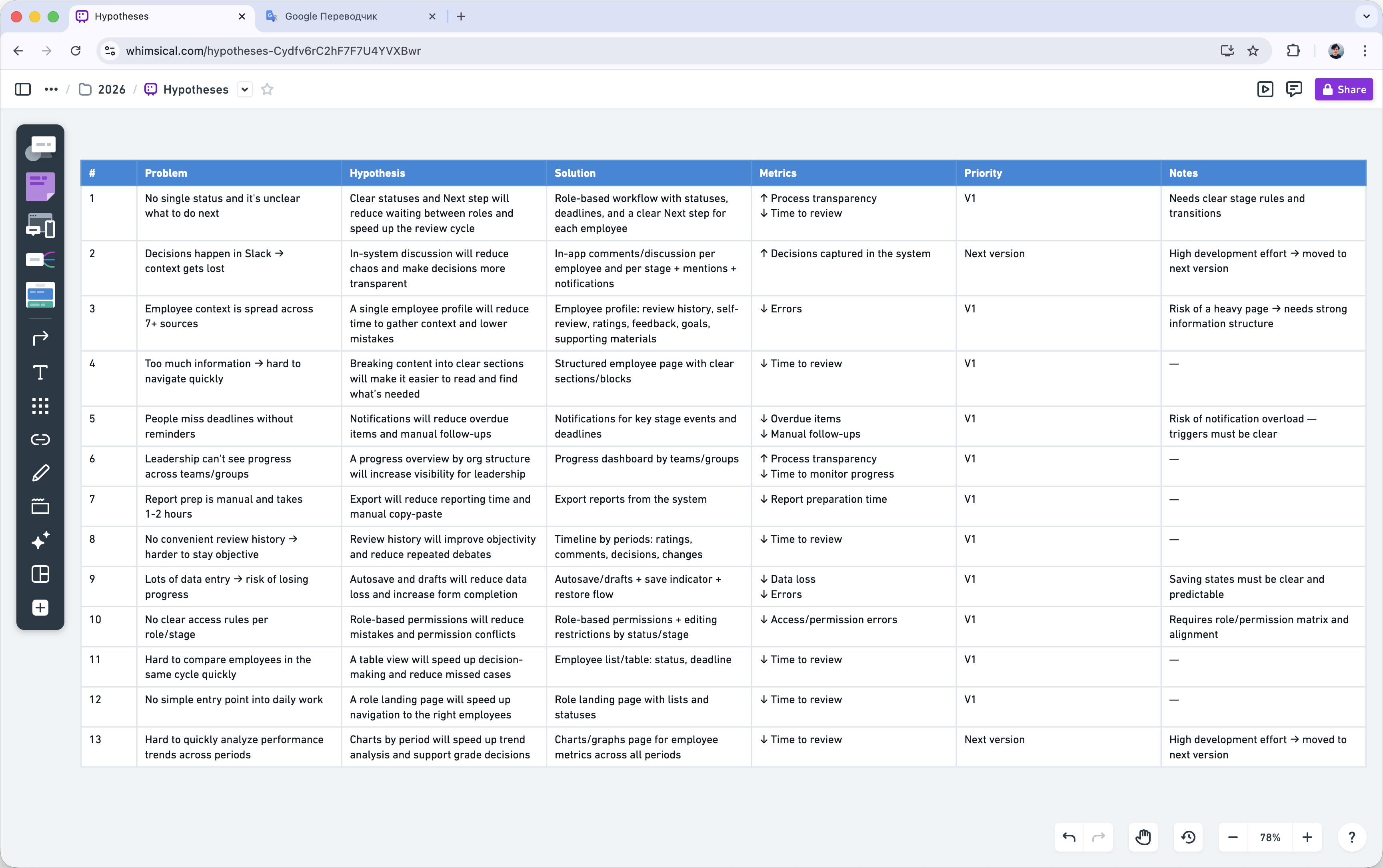
Defined Product Hypotheses
Aligned priorities with the team
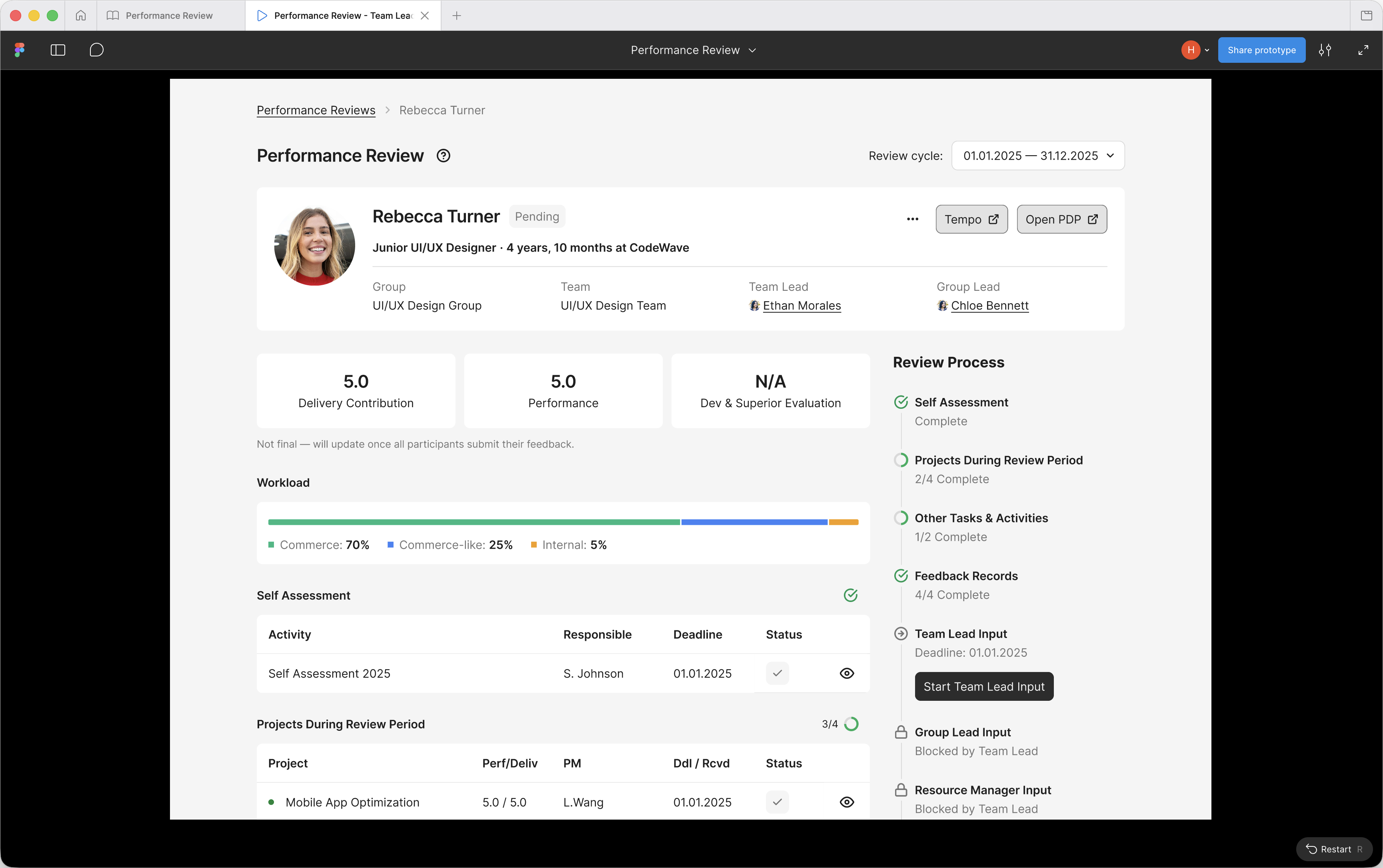
Prototype & User Testing
Clarified scenarios and validated solutions
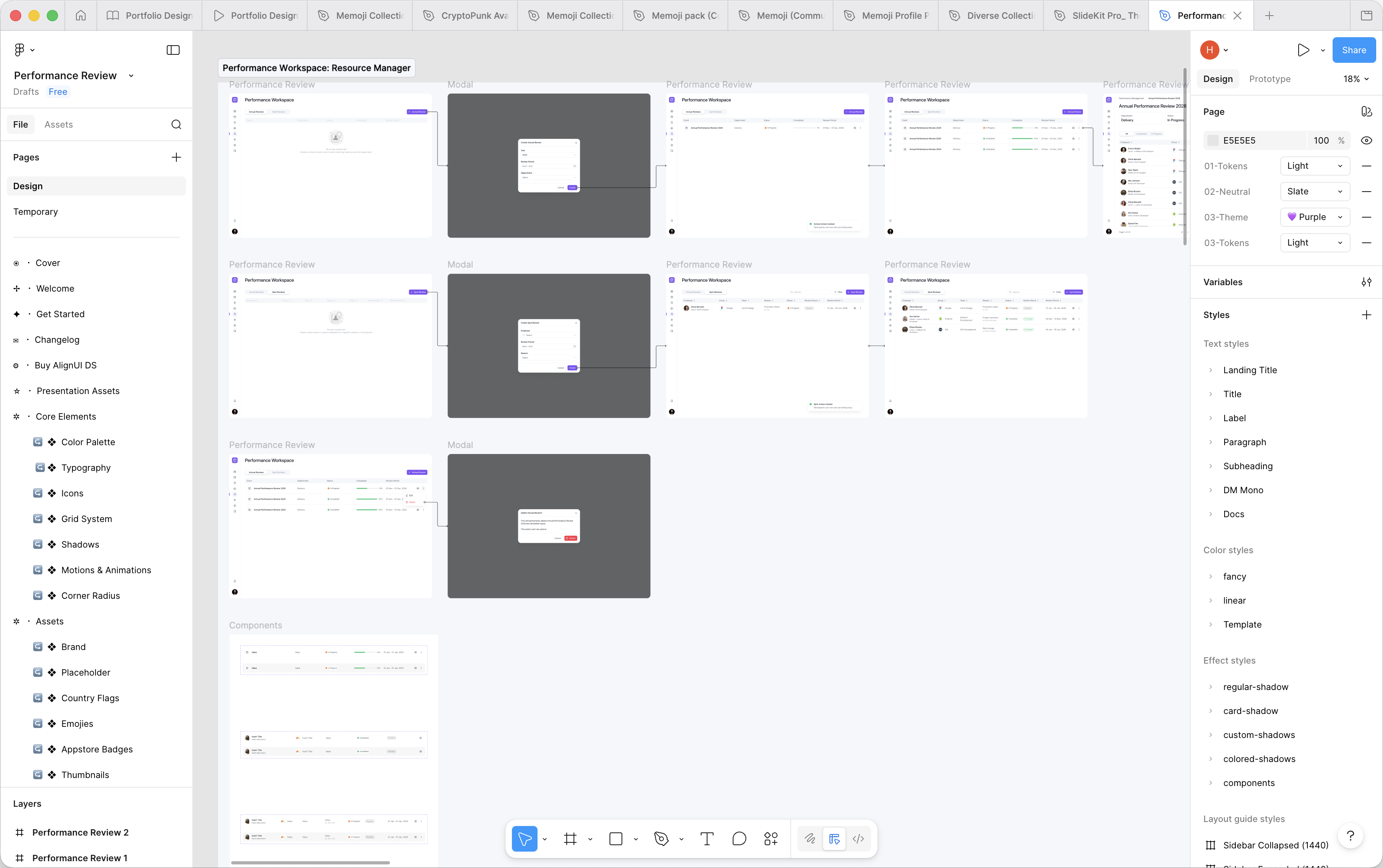
Final Design & Handoff
Updated states and handed off to development
Users
Experienced IT Managers
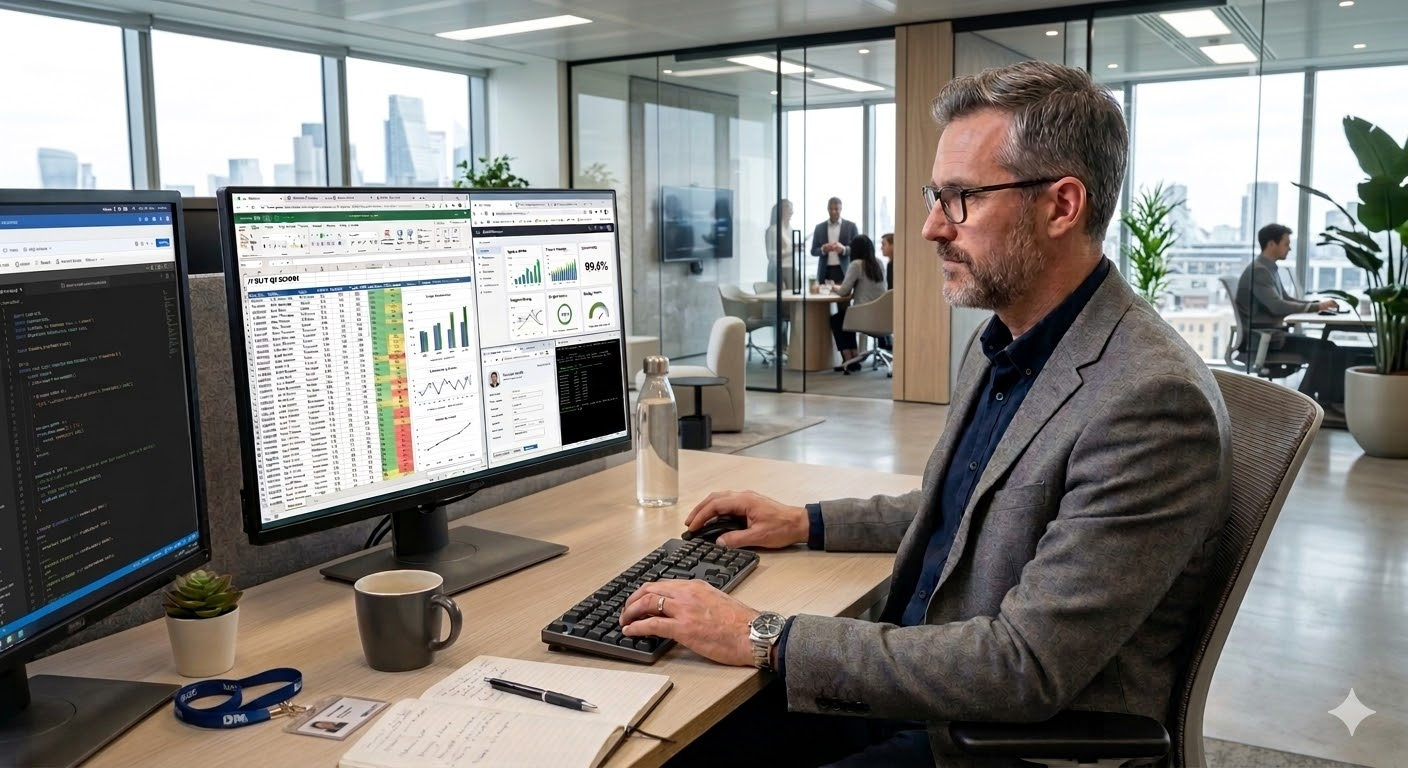

Desktop-based, experienced users

Data-heavy work across tabs

Quick context review

Switching tasks and returning later

Tight deadlines and role dependencies

Repeated actions across 6–20 employees
Constraints

Multi-Role Workflow Dependencies

Large Volume of Data to Review

Communication Outside the System in V1

Steps and Statuses in Other Systems

Risk of Progress Loss During Input

Risk of Losing Context Across Sections
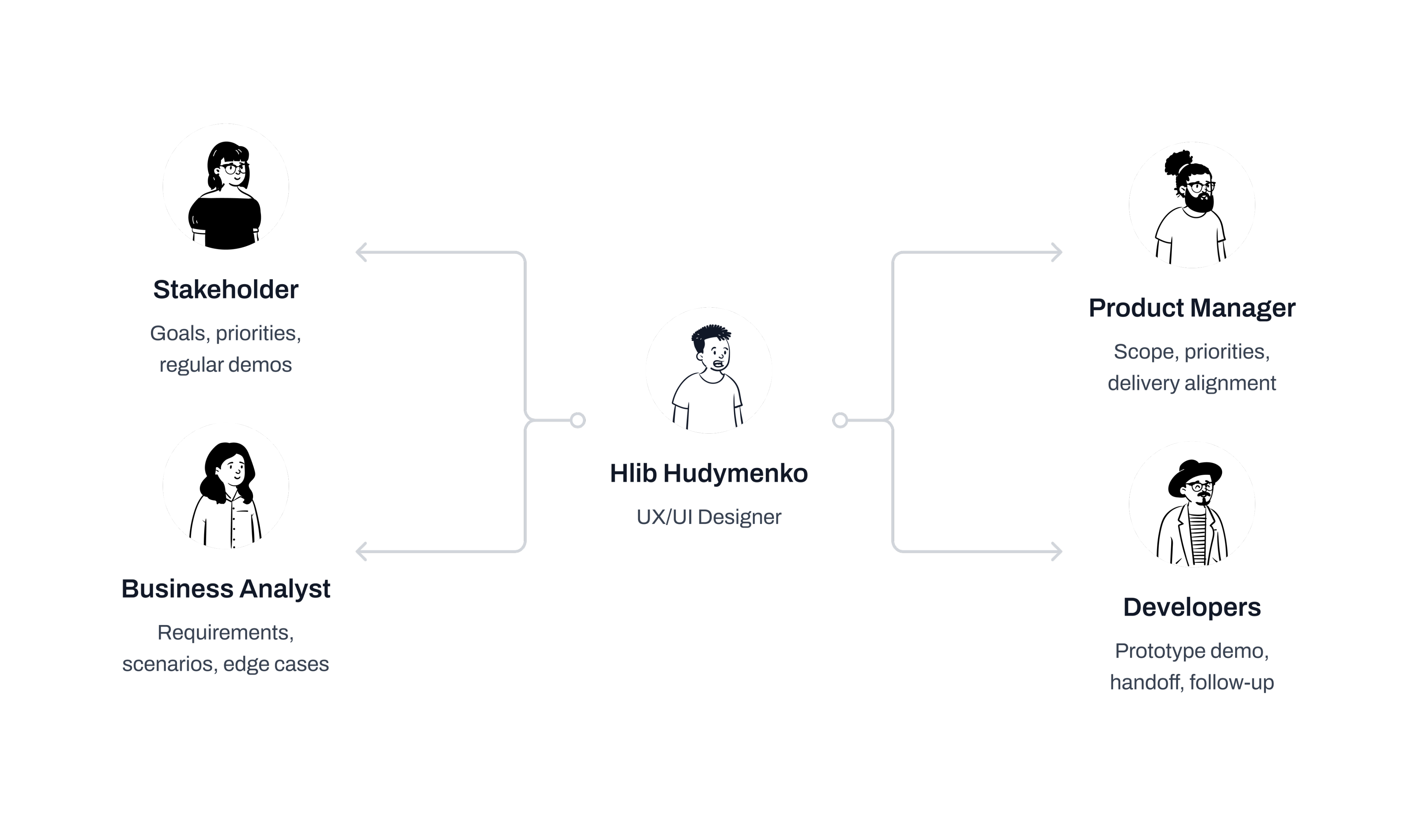
Roles & Responsibilities
How I Worked with the Team
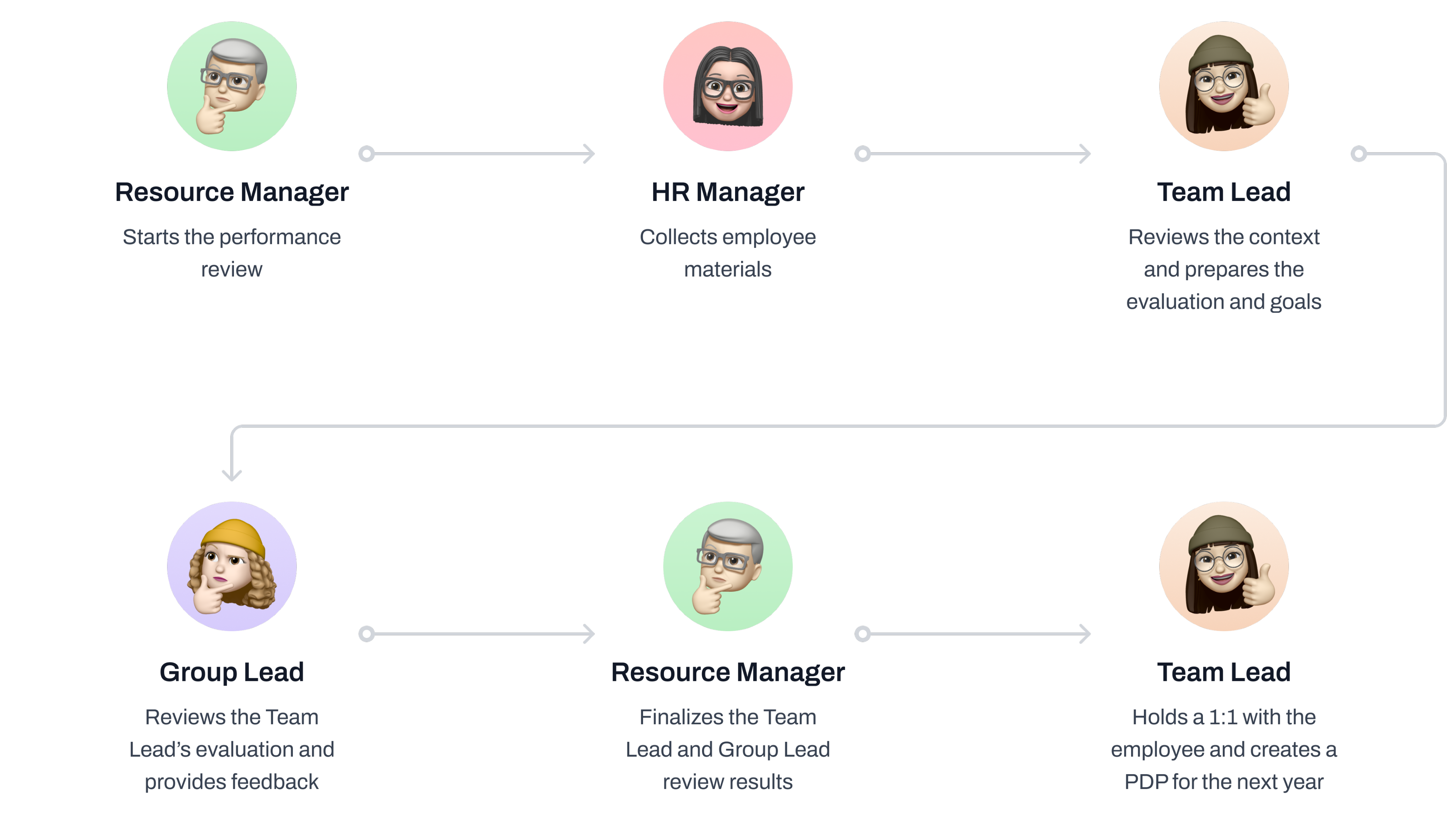
Review Process Analysis
Analyzed Key Documents to Understand the Review Process and Role Connections
Benchmark Analysis
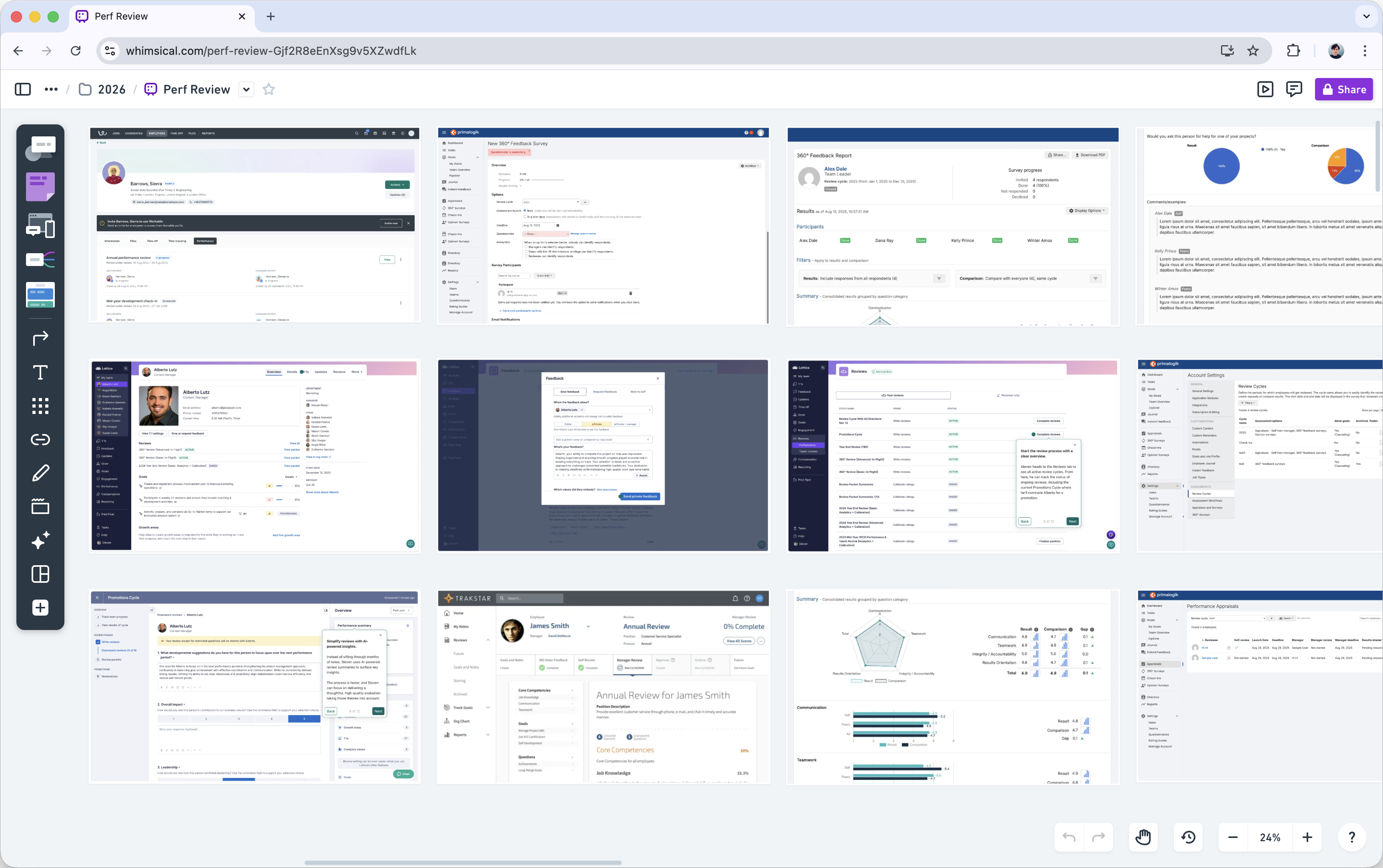
Conducted Benchmark Research to Inform Future Design Decisions

Collected ideas for product hypotheses
Explored content-heavy page structures
Identified patterns adaptable to the project
Product Hypotheses
Formed Product Hypotheses and Visualized Lo-Fi Wireframes for a Stakeholder Demo
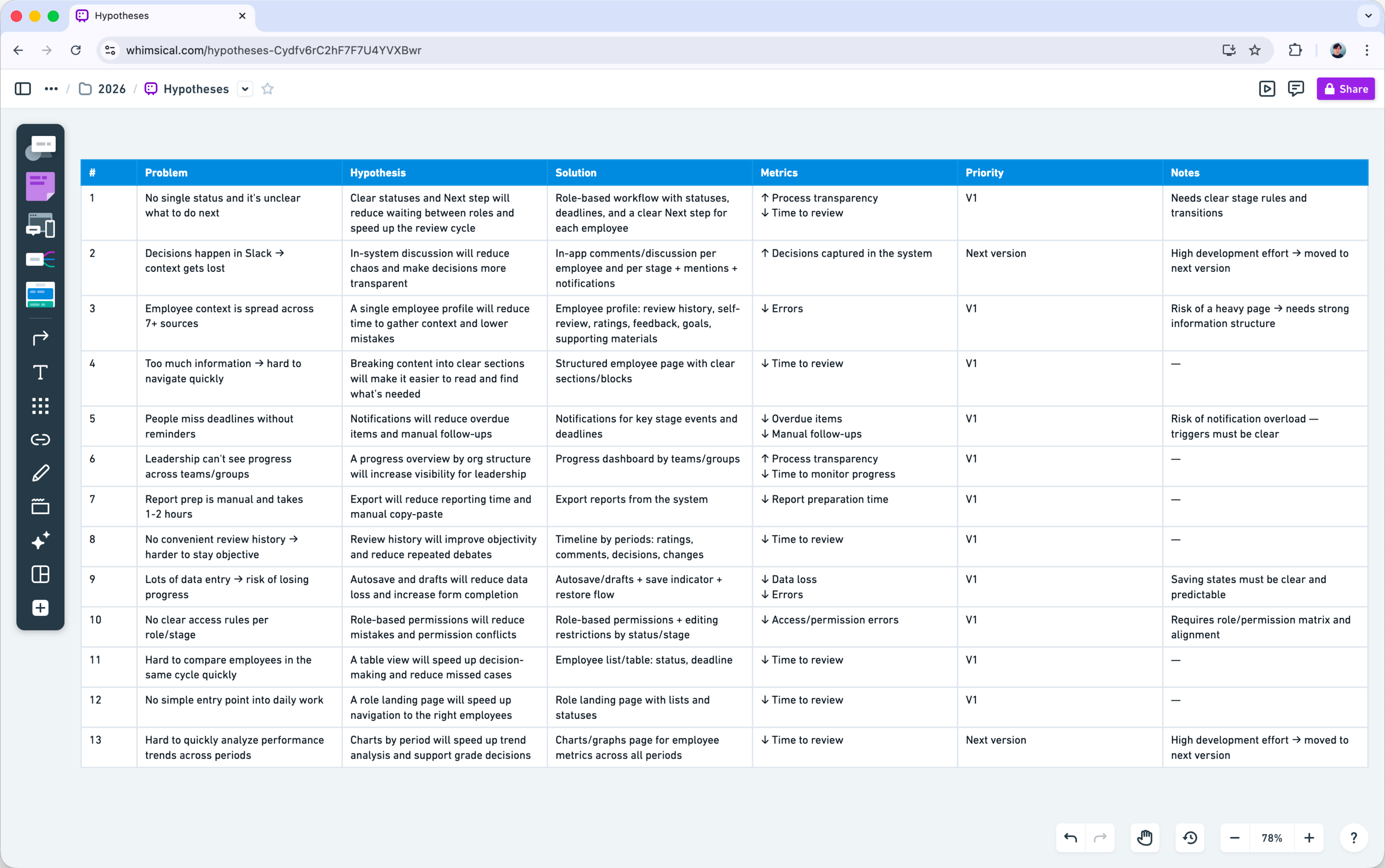
Presented the AI-assisted lo-fi demo and gathered feedback
Prioritized the hypotheses after the demo discussion
Prepared a task list and design work plan for the next steps
User Testing
Built a Clickable Prototype from Detailed Wireframes and Conducted User Testing
Validated in Testing
- Clear stages and next step
- A single employee profile
- Access to history across past periods
- The side panel layout
- Visible deadlines and progress
- Highlighted grade mismatches

Areas for Improvement
- Simplify table organization
- Add Expand mode for the side panel
- Add a Workload section with projects
- Add in-app communication
- Improve copy and action hints
- Add time tracking for feedback
- Add onboarding with a short guide or video
Role-based Performance Workspace
Problem
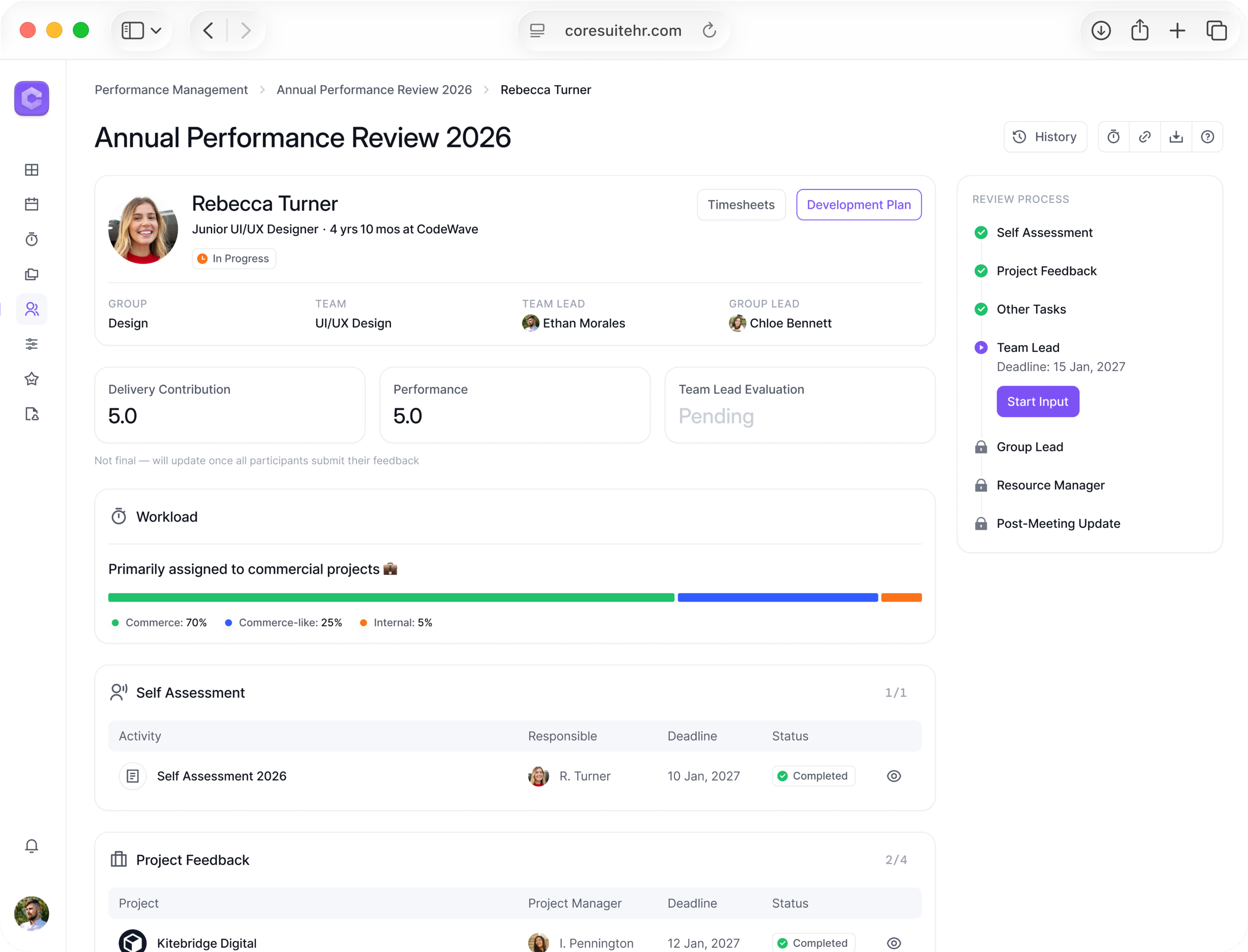
No single place to start reviews and track progress across roles
Solution
- One Performance Workspace with role-based access
- Annual Review runs a department cycle for a set period
- Spot Review starts a review for a specific employee
- Resource Manager starts Annual and Spot reviews company-wide
- Group Lead and Team Lead start Spot reviews within their scope
Impact
Clear progress tracking at every level with less manual coordination
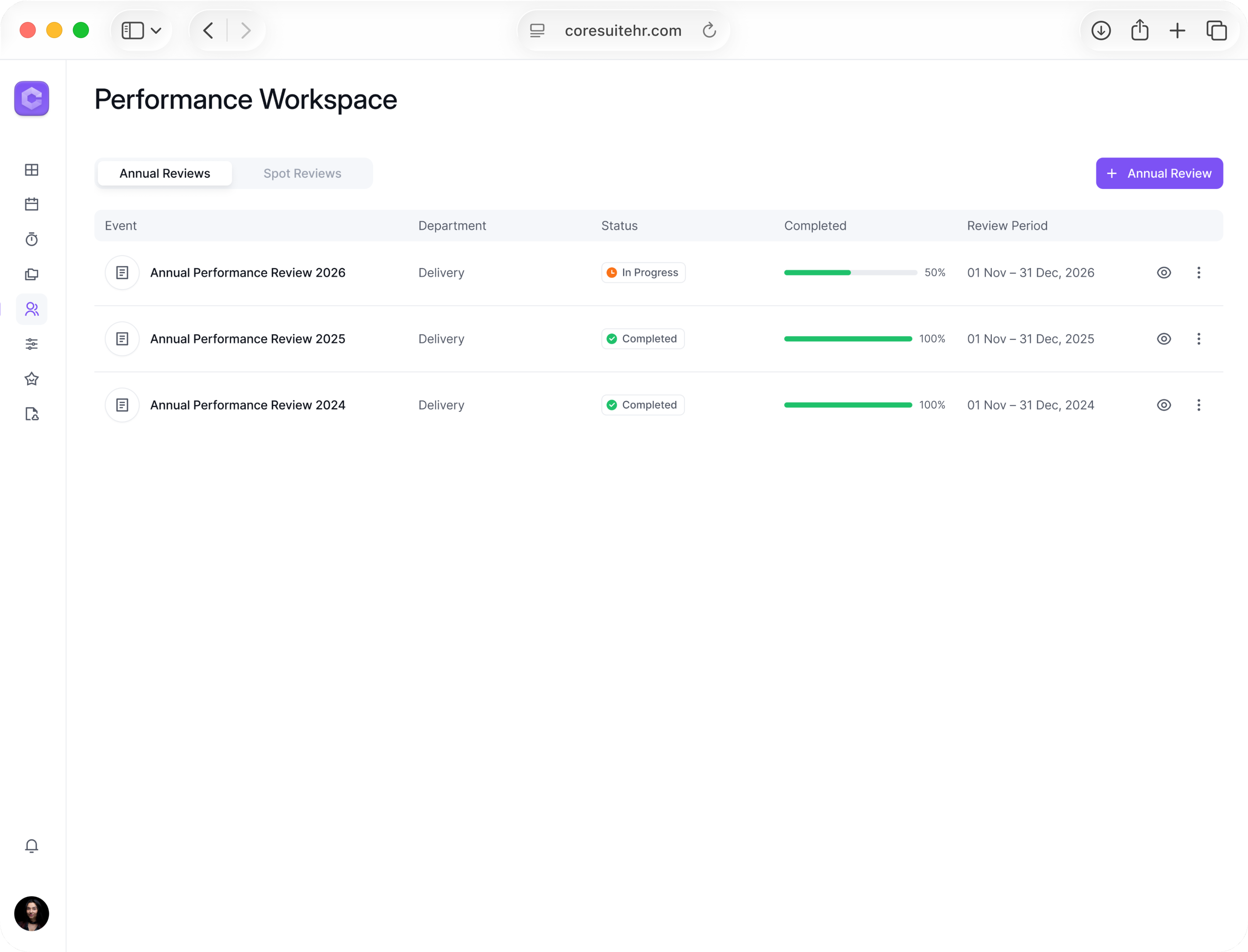
Department cycles in one place with status, progress, and period
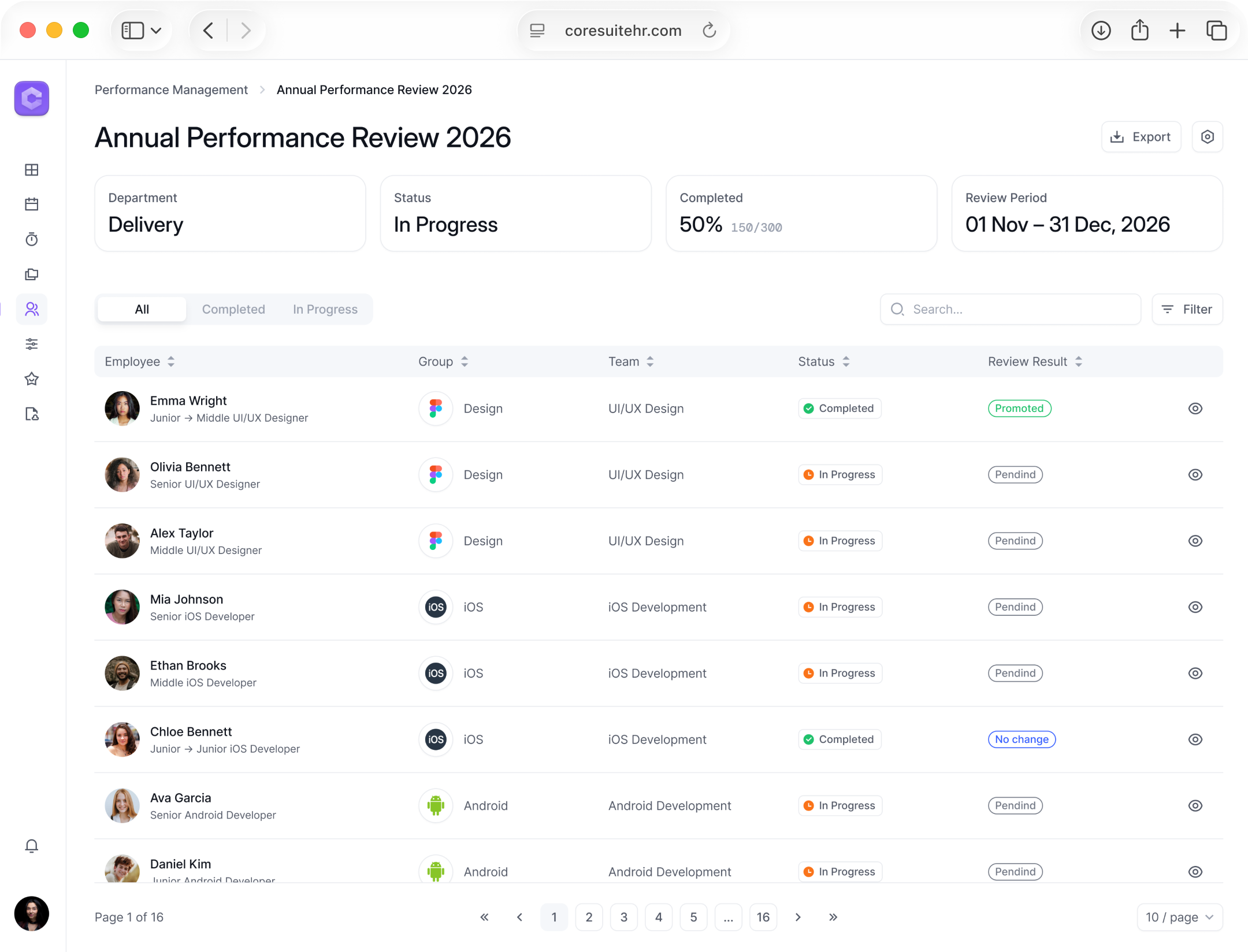
Employee-level progress with filters and export
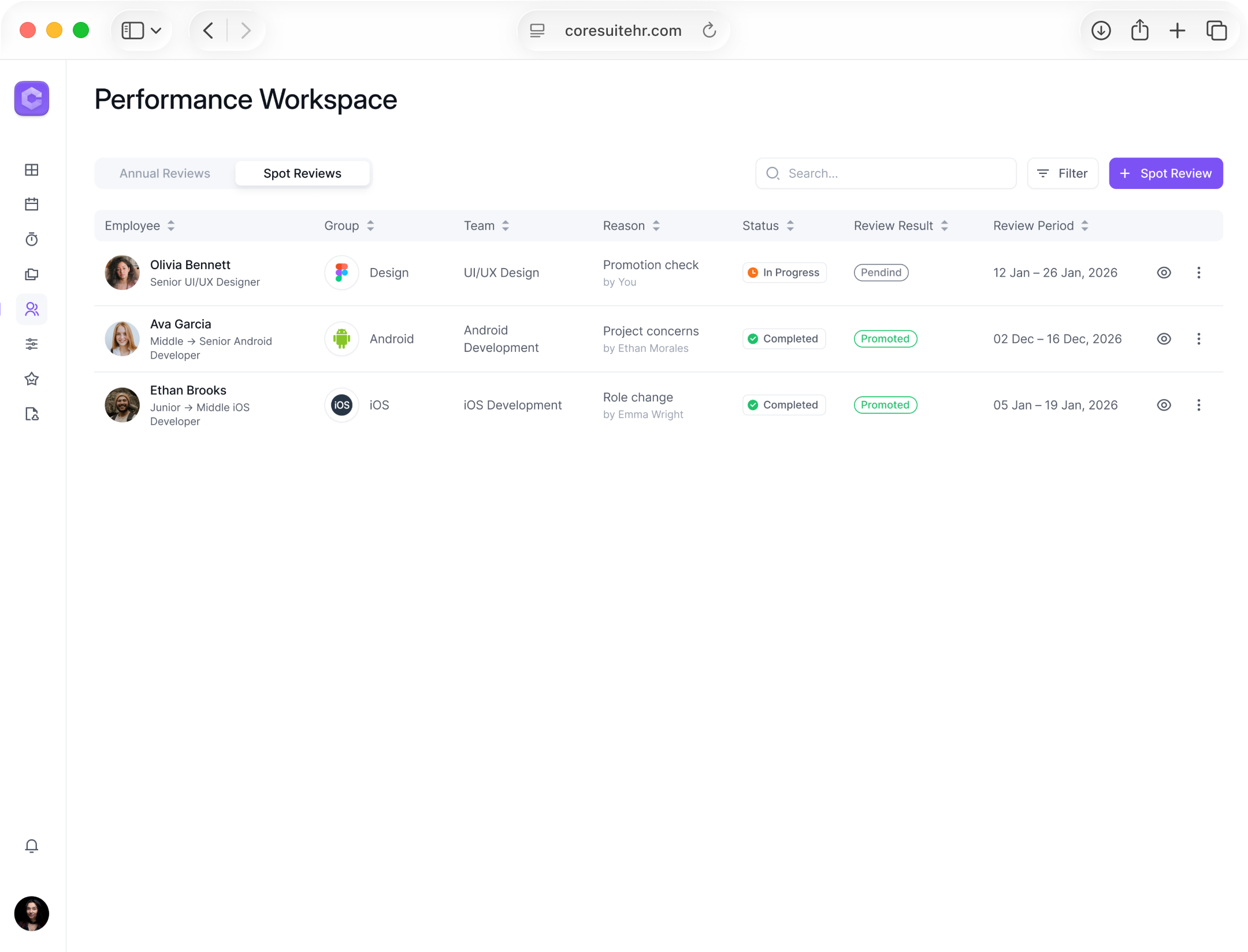
Spot reviews by employee with reason, status, result, and period
Team Lead Assessment Workflow
Problem
Team Lead needs full context to submit input without losing focus
Solution
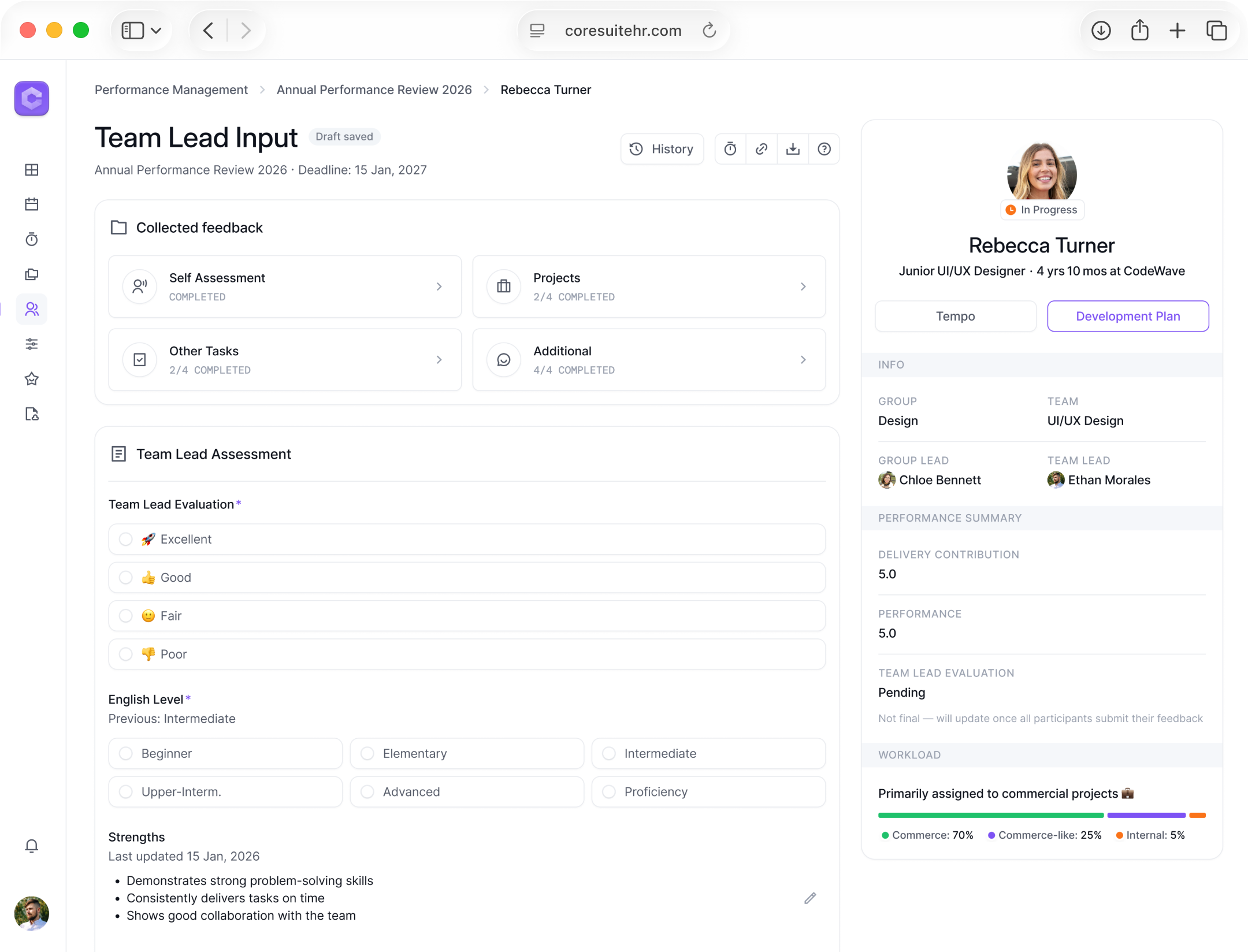
- Review page groups feedback and key data for a clear decision
- Input stays next to the context, with an option to open it full screen
- Autosave keeps drafts safe, long text expands when needed
- After submit, the input is saved in history and supports key actions
Impact
Faster, more confident decisions with fewer context switches
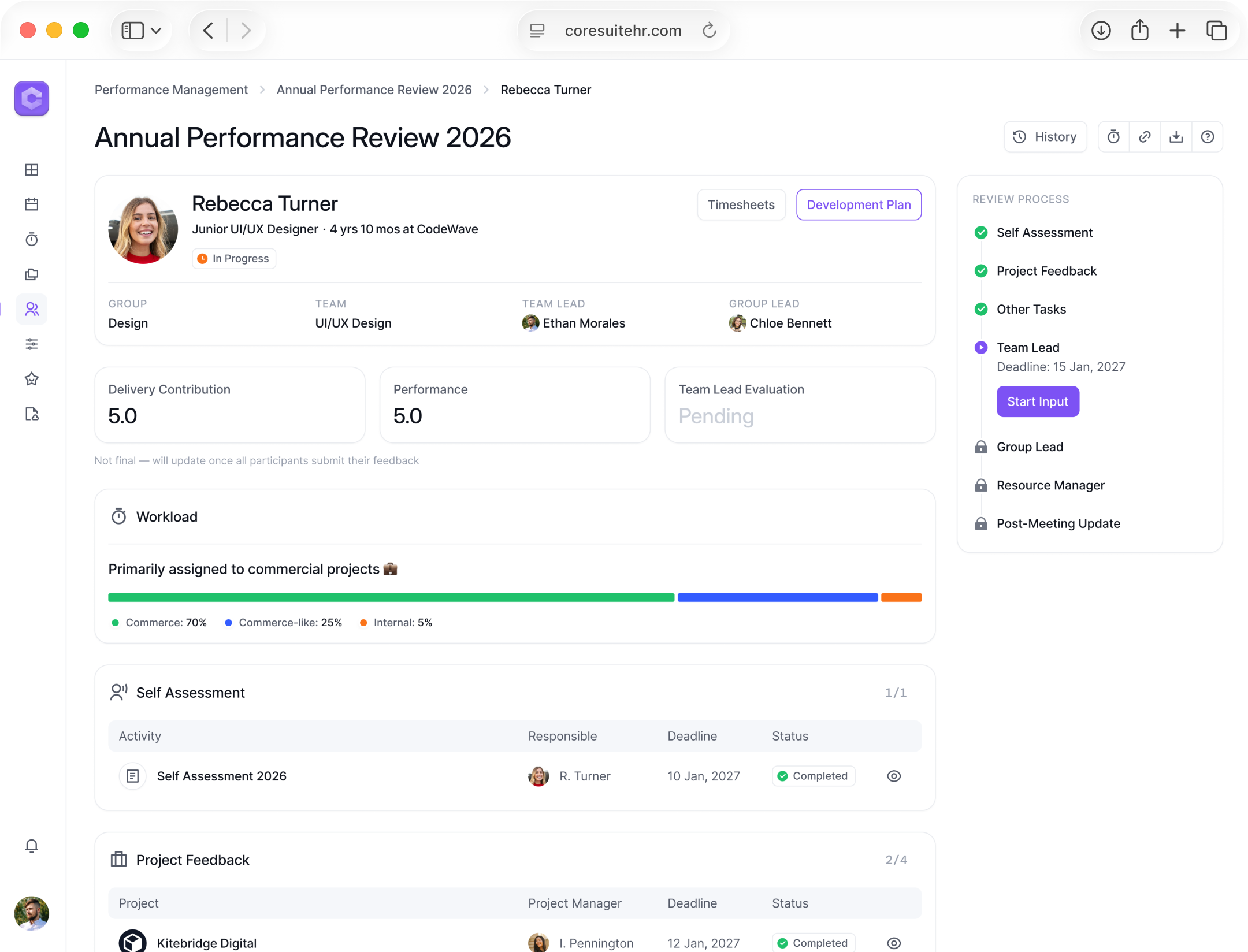
All review context in one place for a clear decision
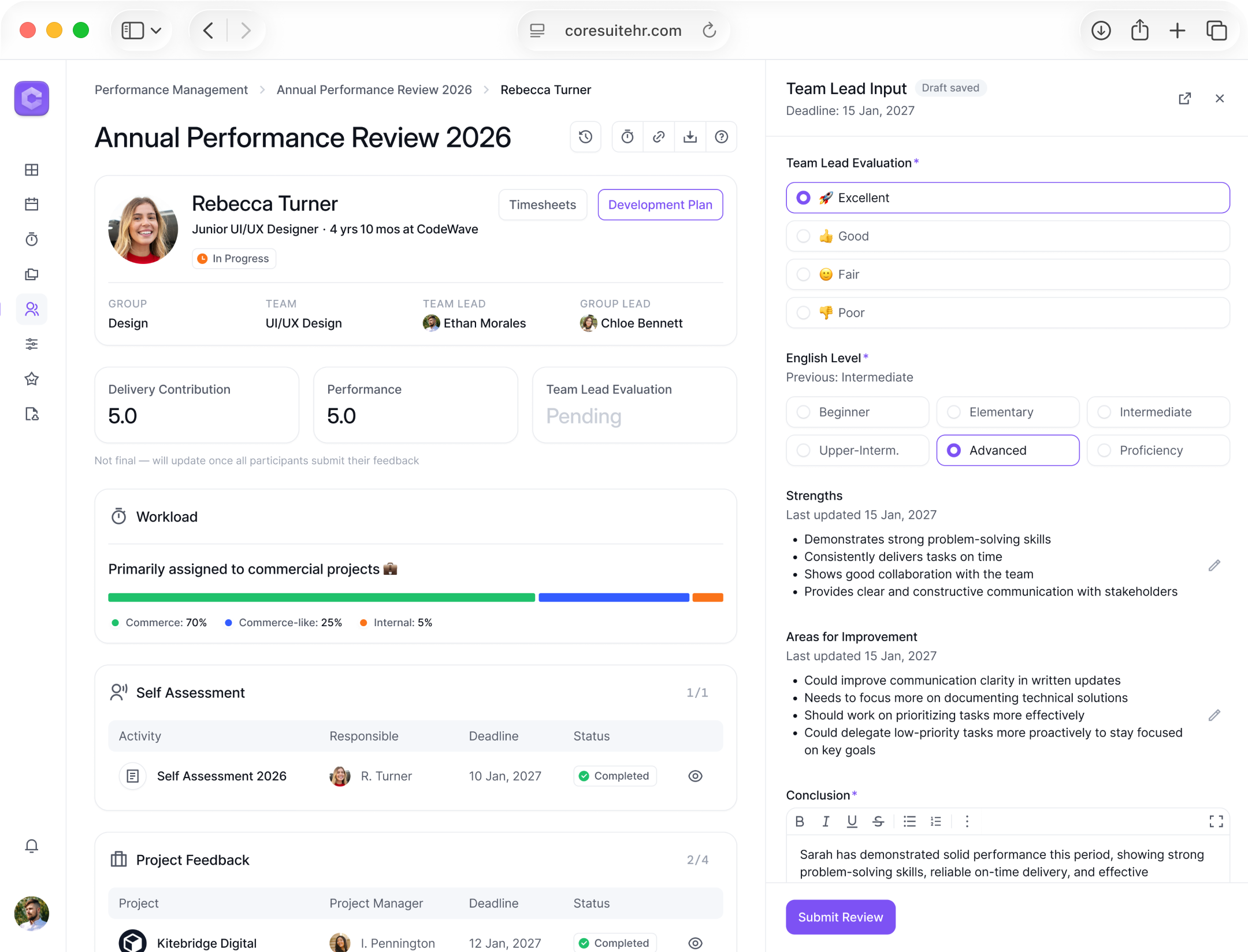
Team Lead fills the input in a side panel without losing context
Full-page mode for focused input in a separate tab
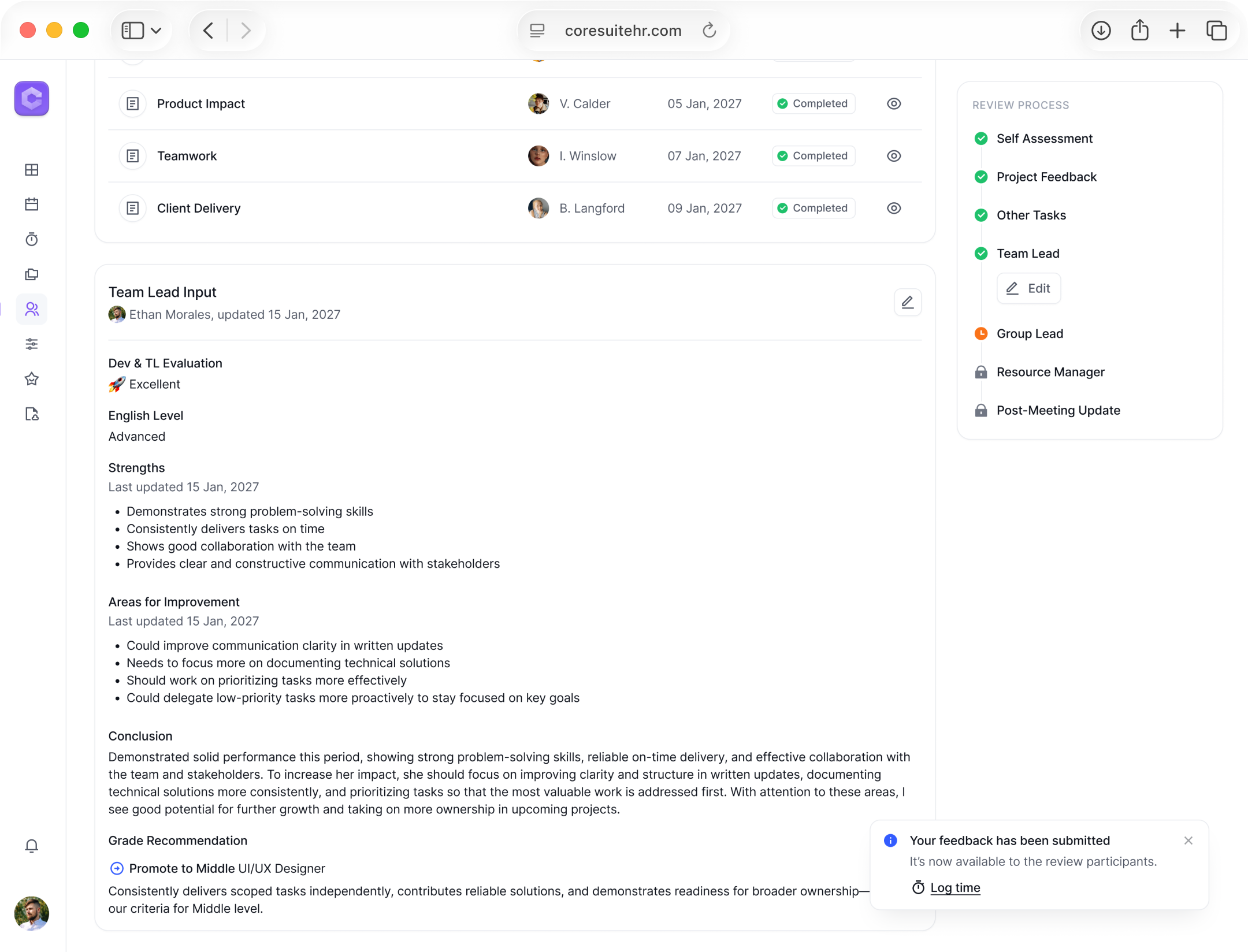
Input is saved in history with author and date, and stays editable
Capturing Untracked Work
Problem
Not all employee tasks can be tracked in the system. Important activities can be missed, and the review context becomes incomplete
Solution
- Team Lead adds untracked tasks in Other Tasks to capture real work
- For each task, the lead can give feedback or ask the task owner for it
Impact
A more complete review picture and fewer missed contributions
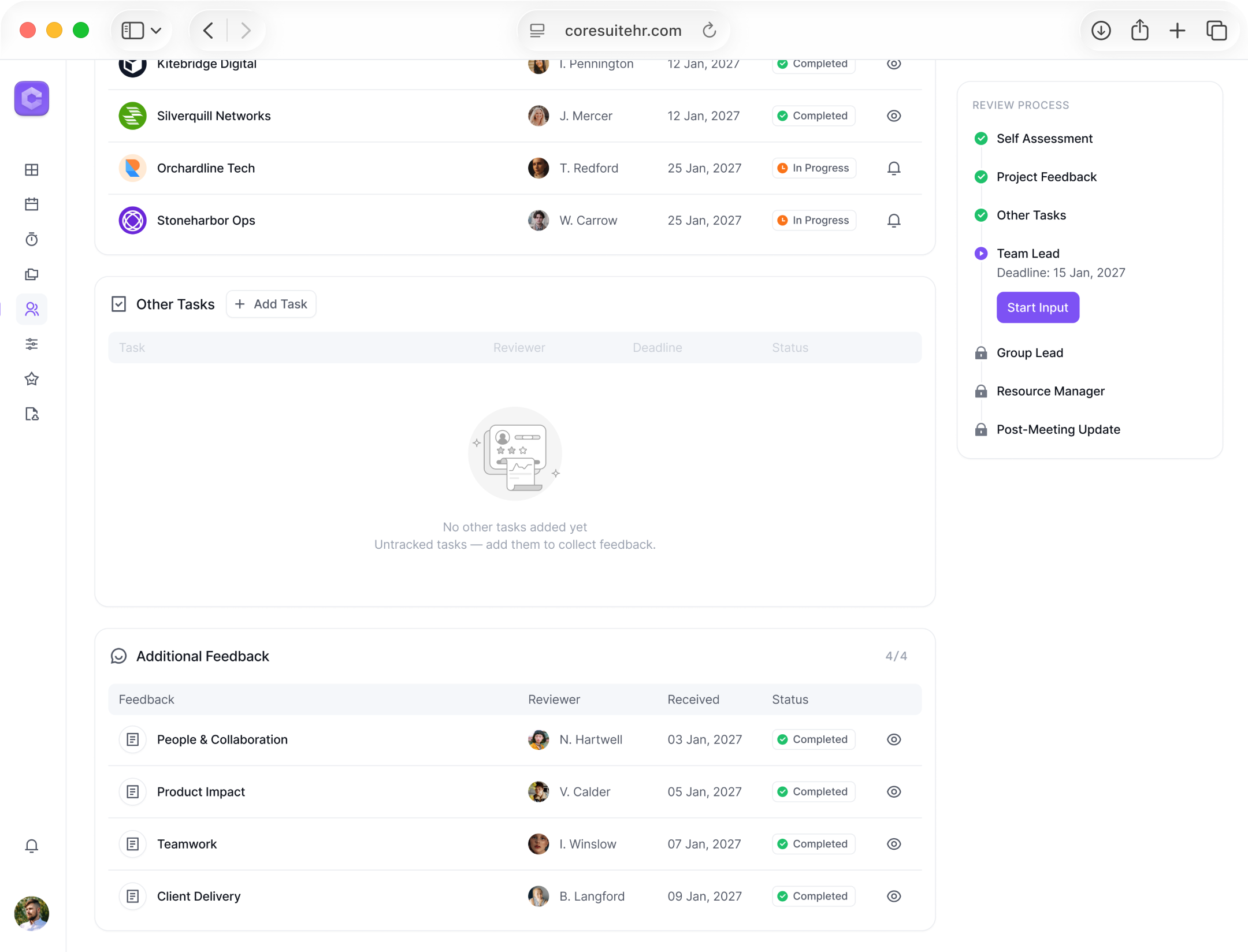
Other Tasks section for work outside tracked projects
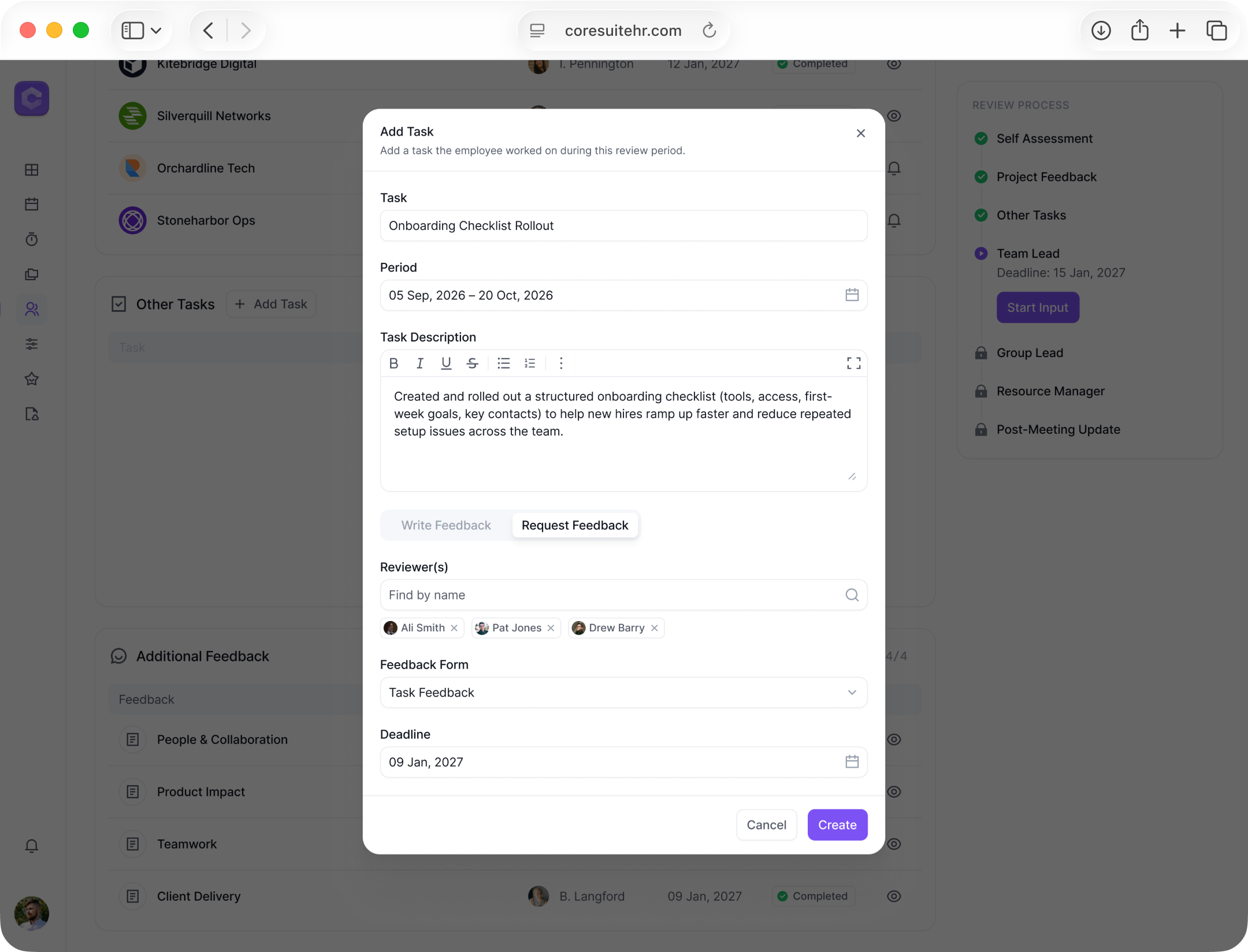
Team Lead adds a task and requests feedback from selected people with a deadline
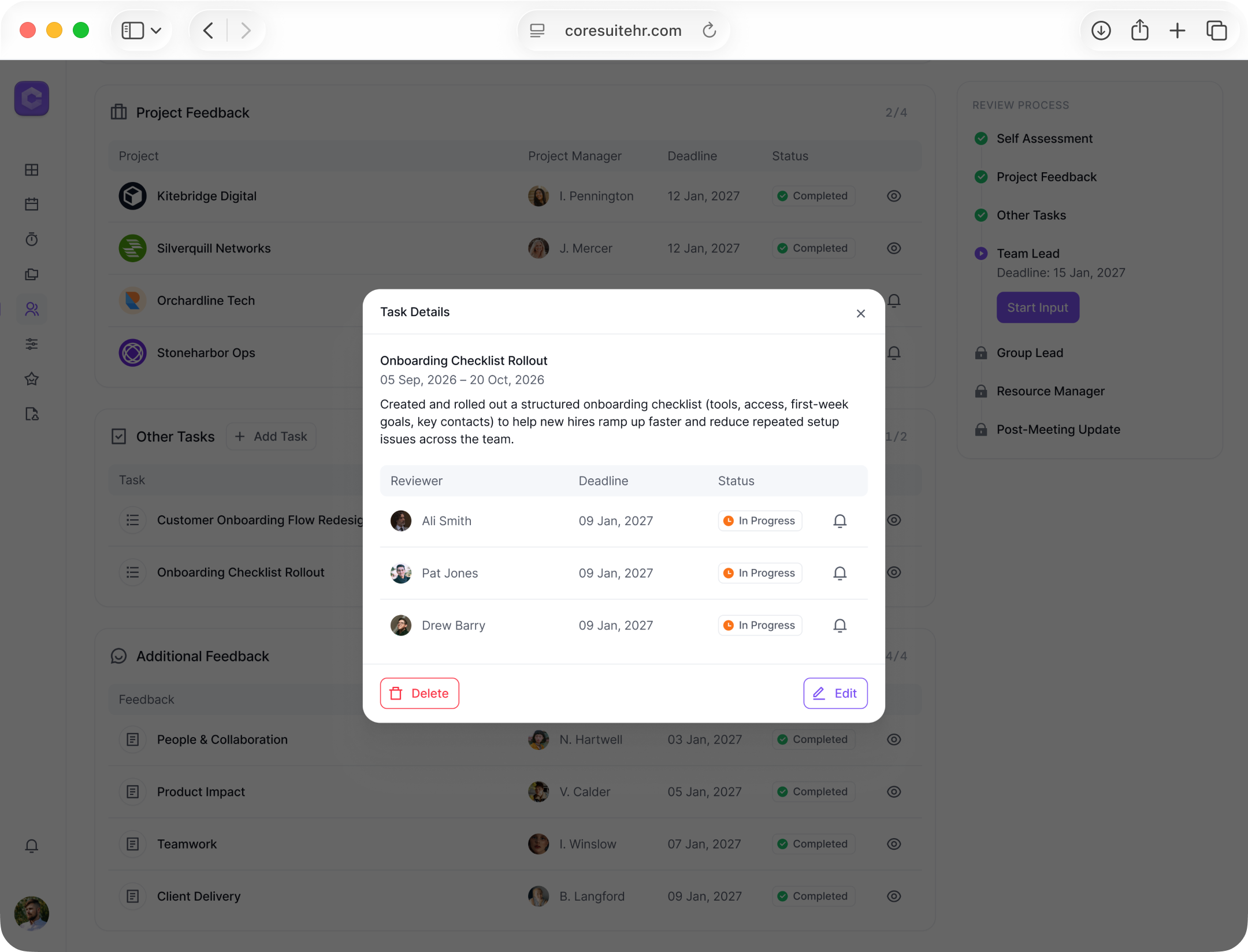
Requested reviews stay linked to the review with visible statuses
Group Lead and Resource Manager Approval
Problem
Approvers need to confirm the final outcome quickly and handle disagreements without losing clarity
Solution
- Same approval flow for Group Lead and Resource Manager
- Approver chooses Approve or Propose different with a short reason
- If recommendations differ, the system flags it and asks to align in Slack
Impact
Transparent approval: clear statuses, conflicts visible, path to one outcome
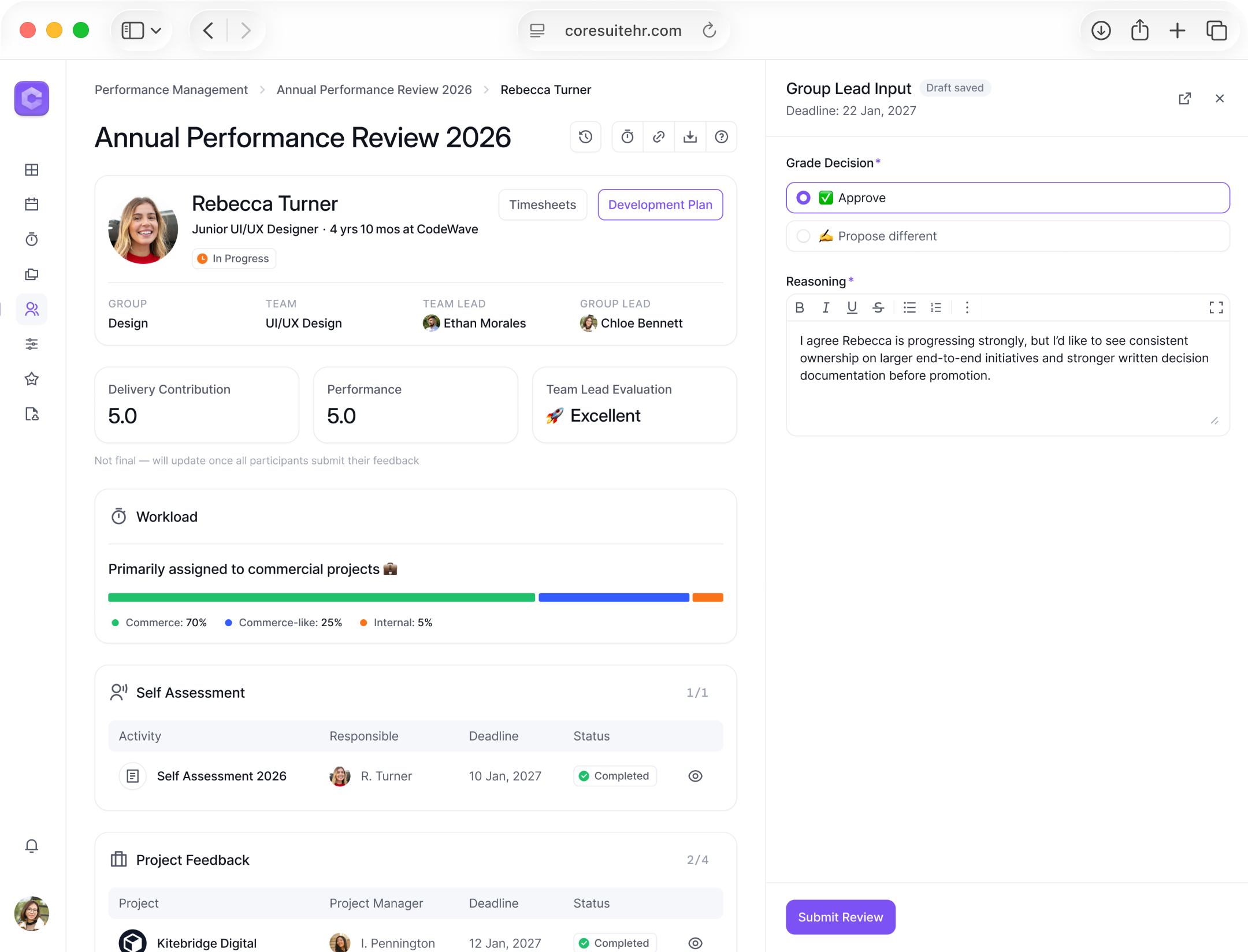
Approver confirms the Team Lead decision and adds short reasoning
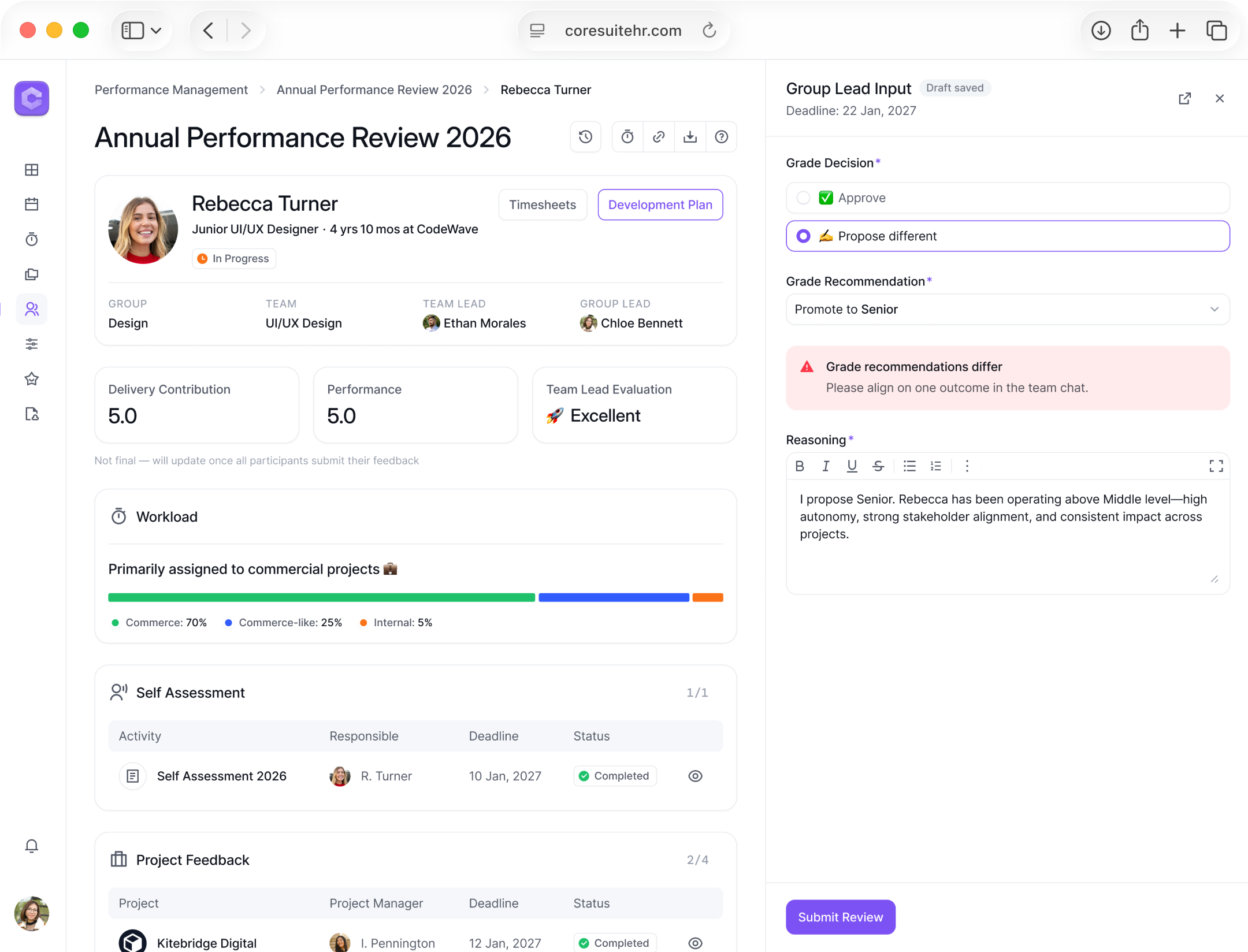
If they disagree, the system flags the mismatch and prompts alignment in Slack
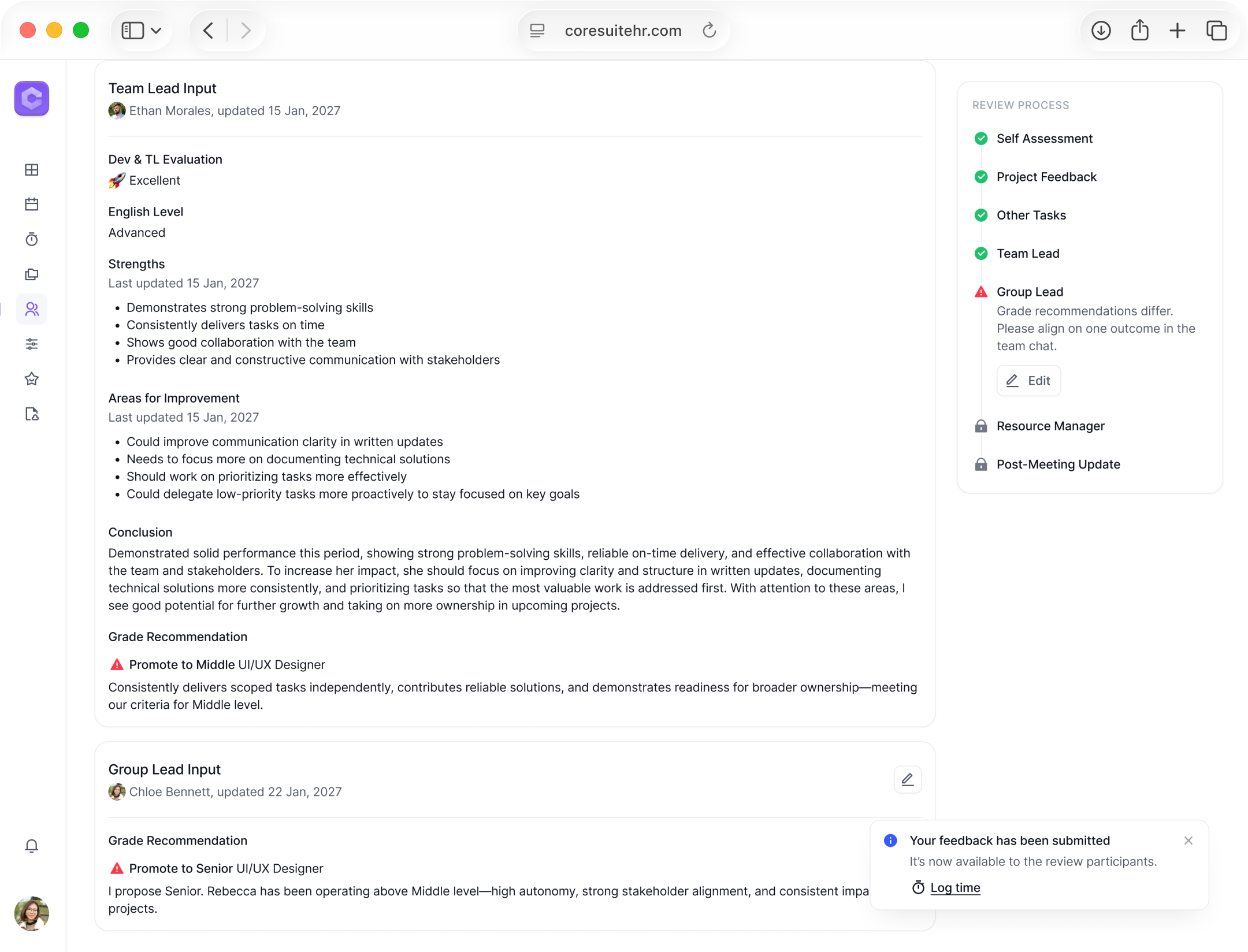
The response is saved and stays visible until everyone aligns
Finalizing the Performance Review
Problem
Once aligned, the final outcome must be saved to close the review
Solution
- Team Lead submits a post-meeting update after the 1:1
- The review becomes read-only with the final status and grade change
- Summary shows the outcome, Review History keeps the full timeline
Impact
A clean finish to the process: the outcome is locked, the history is preserved, and there is no confusion about what changed
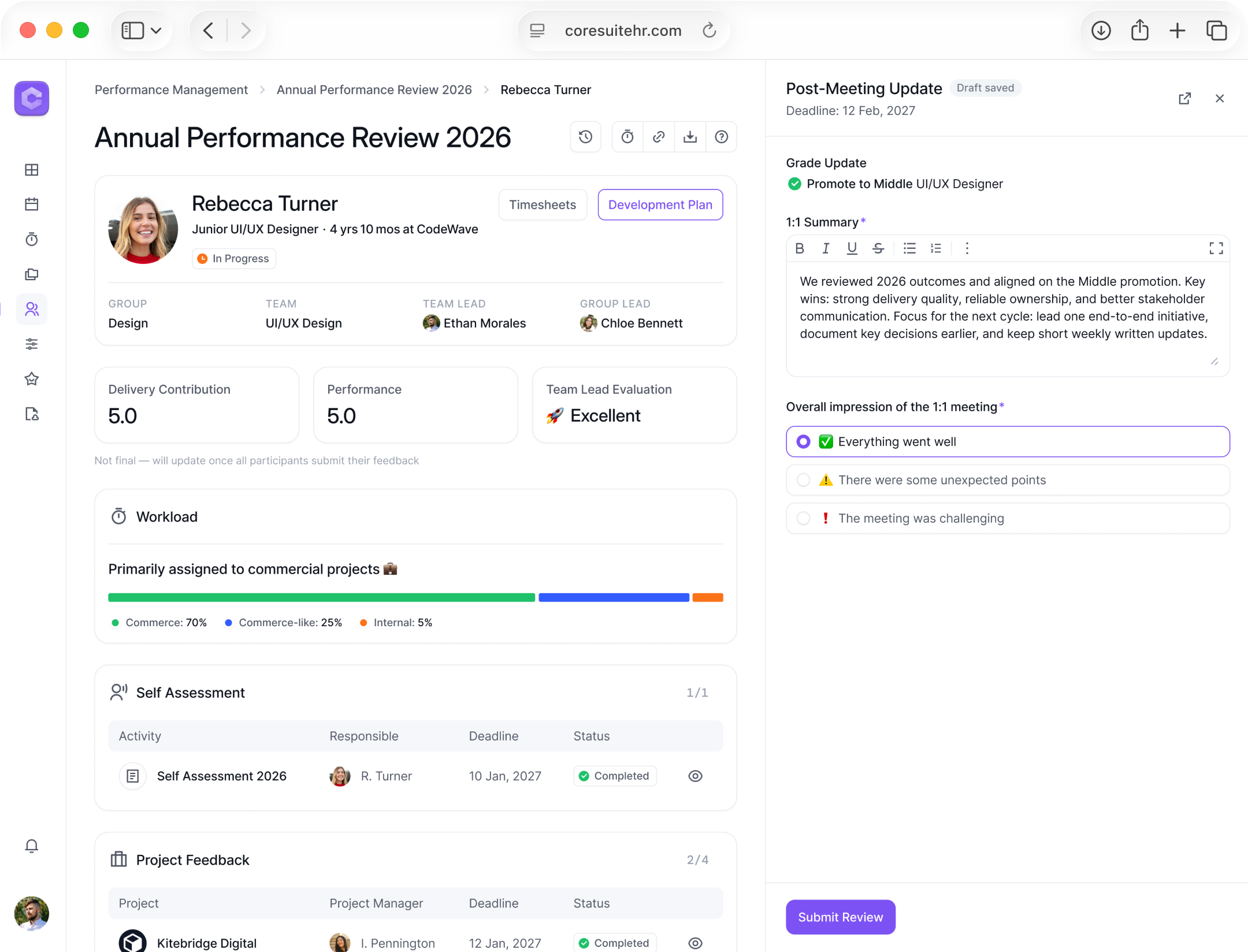
Team Lead records the 1:1 outcome and confirms the final grade update
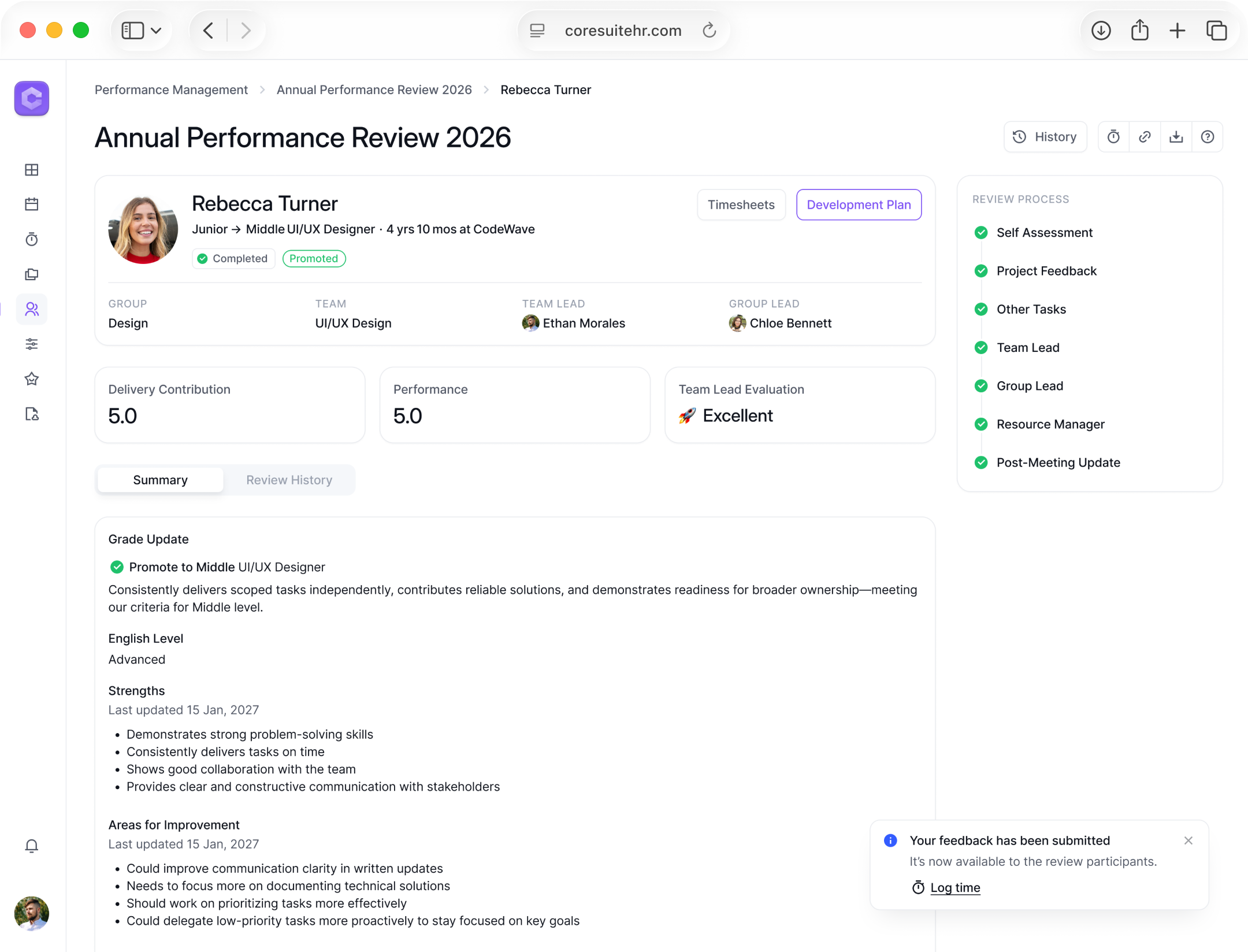
Read-only state with final status and grade change in Summary, full timeline in Review History
Outcomes
Before
After
Before
After


Employee Context
7+
Sources
↓1
Employee page

Report Preparation
1–2 h
Manual summary
↓5 min
Dashboard + export

Process Transparency
No tracking
No single status or owner
Clear progress
Status, deadline, role progress
Key Takeaways
Lessons Learned
- Status + next step make multi-role workflows manageable
- One employee page reduces context switching and missed details
- Autosave and a read-only final state prevent data loss
Next Steps
- Move alignment into the system with comments or chat
- Scale to other departments with configurable rules and forms
- Add cross-cycle analytics for ratings, outcomes, and trends
Let's Connect

Next Project

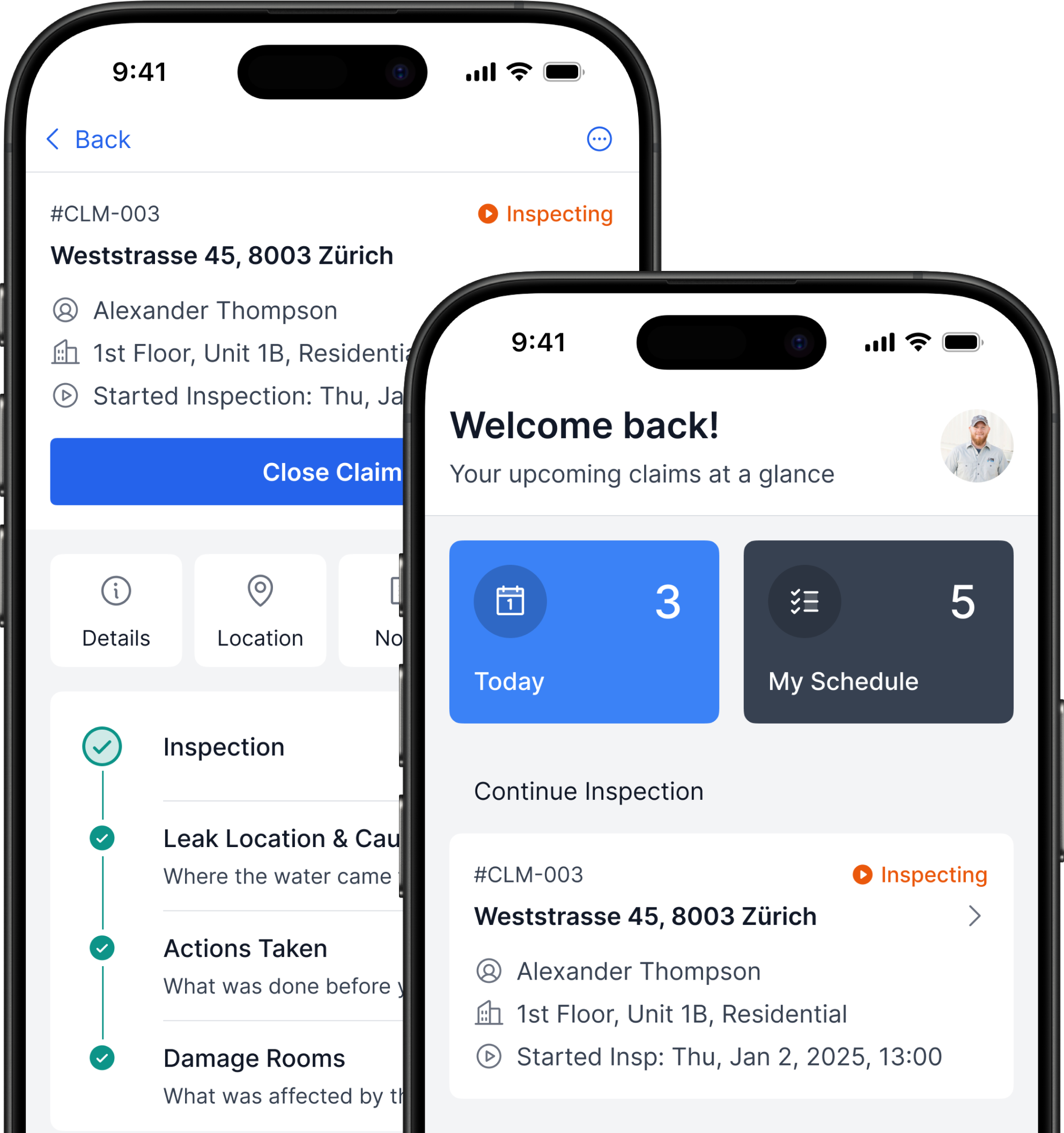
Flood Inspections: from manual work to a 2× faster workflow with fewer errors
B2B iOS App UX/UI Case Study 10–15 min read
Performance Reviews: from Docs and Slack to a role-based workflow
HR Tech SaaS UX/UI Case Study15–20 min read
Domain
HR Tech, Performance Management, Internal Tools
Technology
Web App SaaS, Role-based access, Data tables, Dashboards
My Role
UX/UI Designer
Timeline
6 months, 2025–2026
Deliverables
- UX hypotheses
- Role-based workflow
- Information architecture
- Wireframes
- Interactive prototype
- Usability testing
- Final mockups + handoff to dev
- Tools: Figma, Whimsical, Jira, Confluence, ChatGPT
The Team
1 × Stakeholder
1 × Business Analyst
1 × Product Manager
2 × Front-end Developers
2 × Back-end Developers
Overview
Context
An IT company runs annual performance reviews to track employee results and effectiveness
Problem
Performance reviews lived in Google Docs. The process was slow and not transparent — progress and employee history weren’t visible in one place
Expected Result
Design a Performance Review module with a role-based workflow, progress tracking, evaluation forms, and one employee review history page
Outcomes
- Clear review progress: status, progress, next step in one view
- One employee page: year context and past review history in one place
- Leadership dashboard: team progress and report exports
- Pilot tested with 4 users to simplify and structure the flow
Problem Statement
Performance Reviews in Google Docs and Slack: A Slow Process with No Statuses or Employee History
Expected Outcome
Make Performance Reviews Transparent and Reduce User Load
My Process
Stakeholder Alignment Session
Goals, roles, constraints, and success metrics
Process Analysis & Benchmarking
Identified pain points, requirements, and ideas
Defined Product Hypotheses
Aligned priorities with the team
Prototype & User Testing
Clarified scenarios and validated solutions
Final Design & Handoff
Updated states and handed off to development
Users
Experienced IT Managers
Desktop-based, experienced users
Data-heavy work across tabs
Quick context review
Switching tasks and returning later
Tight deadlines and role dependencies
Repeated actions across 6–20 employees
Constraints
Multi-Role Workflow Dependencies
Large Volume of Data to Review
Communication Outside the System in V1
Steps and Statuses in Other Systems
Risk of Progress Loss During Input
Risk of Losing Context Across Sections
Roles & Responsibilities
How I Worked with the Team
Review Process Analysis
Analyzed Key Documents to Understand the Review Process and Role Connections
Benchmark Analysis
Conducted Benchmark Research to Inform Future Design Decisions
Collected ideas for product hypotheses
Explored content-heavy page structures
Identified patterns adaptable to the project
Product Hypotheses
Formed Product Hypotheses and Visualized Lo-Fi Wireframes for a Stakeholder Demo
Presented the AI-assisted lo-fi demo and gathered feedback
Prioritized the hypotheses after the demo discussion
Prepared a task list and design work plan for the next steps
User Testing
Built a Clickable Prototype from Detailed Wireframes and Conducted User Testing
Validated in Testing
- Clear stages and next step
- A single employee profile
- Access to history across past periods
- The side panel layout
- Visible deadlines and progress
- Highlighted grade mismatches
Areas for Improvement
- Simplify table organization
- Add Expand mode for the side panel
- Add a Workload section with projects
- Add in-app communication
- Improve copy and action hints
- Add time tracking for feedback
- Add onboarding with a short guide or video
Role-based Performance Workspace
Problem
No single place to start reviews and track progress across roles
Solution
- One Performance Workspace with role-based access
- Annual Review runs a department cycle for a set period
- Spot Review starts a review for a specific employee
- Resource Manager starts Annual and Spot reviews company-wide
- Group Lead and Team Lead start Spot reviews within their scope
Impact
Clear progress tracking at every level with less manual coordination
Department cycles in one place with status, progress, and period
Employee-level progress with filters and export
Spot reviews by employee with reason, status, result, and period
Team Lead Assessment Workflow
Problem
Team Lead needs full context to submit input without losing focus
Solution
- Review page groups feedback and key data for a clear decision
- Input stays next to the context, with an option to open it full screen
- Autosave keeps drafts safe, long text expands when needed
- After submit, the input is saved in history and supports key actions
Impact
Faster, more confident decisions with fewer context switches
All review context in one place for a clear decision
Team Lead fills the input in a side panel without losing context
Full-page mode for focused input in a separate tab
Input is saved in history with author and date, and stays editable
Capturing Untracked Work
Problem
Not all employee tasks can be tracked in the system. Important activities can be missed, and the review context becomes incomplete
Solution
- Team Lead adds untracked tasks in Other Tasks to capture real work
- For each task, the lead can give feedback or ask the task owner for it
Impact
A more complete review picture and fewer missed contributions
Other Tasks section for work outside tracked projects
Team Lead adds a task and requests feedback from selected people with a deadline
Requested reviews stay linked to the review with visible statuses
Group Lead and Resource Manager Approval
Problem
Approvers need to confirm the final outcome quickly and handle disagreements without losing clarity
Solution
- Same approval flow for Group Lead and Resource Manager
- Approver chooses Approve or Propose different with a short reason
- If recommendations differ, the system flags it and asks to align in Slack
Impact
Transparent approval: clear statuses, conflicts visible, path to one outcome
Approver confirms the Team Lead decision and adds short reasoning
If they disagree, the system flags the mismatch and prompts alignment in Slack
The response is saved and stays visible until everyone aligns
Finalizing the Performance Review
Problem
Once aligned, the final outcome must be saved to close the review
Solution
- Team Lead submits a post-meeting update after the 1:1
- The review becomes read-only with the final status and grade change
- Summary shows the outcome, Review History keeps the full timeline
Impact
A clean finish to the process: the outcome is locked, the history is preserved, and there is no confusion about what changed
Team Lead records the 1:1 outcome and confirms the final grade update
Read-only state with final status and grade change in Summary, full timeline in Review History
Outcomes
Before
After
Before
After

Employee Context
7+
Sources
↓1
Employee page
Report Preparation
1–2 h
Manual summary
↓5 min
Dashboard + export
Process Transparency
No tracking
No single status or owner
Clear progress
Status, deadline, role progress
Key Takeaways
Lessons Learned
- Status + next step make multi-role workflows manageable
- One employee page reduces context switching and missed details
- Autosave and a read-only final state prevent data loss
Next Steps
- Move alignment into the system with comments or chat
- Scale to other departments with configurable rules and forms
- Add cross-cycle analytics for ratings, outcomes, and trends
Let's Connect
Next Project
Flood Inspections: from manual work to a 2× faster workflow with fewer errors
B2B iOS App UX/UI Case Study10–15 min read
Performance Reviews: from Docs and Slack to a role-based workflow
HR Tech SaaS UX/UI Case Study15–20 min read
Domain
HR Tech, Performance Management, Internal Tools
Technology
Web App SaaS, Role-based access, Data tables, Dashboards
My Role
UX/UI Designer
Timeline
6 months, 2025–2026
Deliverables
- UX hypotheses
- Role-based workflow
- Information architecture
- Wireframes
- Interactive prototype
- Usability testing
- Final mockups + handoff to dev
- Tools: Figma, Whimsical, Jira, Confluence, ChatGPT
The Team
1 × Stakeholder
1 × Business Analyst
1 × Product Manager
2 × Front-end Developers
2 × Back-end Developers
Overview
Context
An IT company runs annual performance reviews to track employee results and effectiveness
Problem
Performance reviews lived in Google Docs. The process was slow and not transparent — progress and employee history weren’t visible in one place
Expected Result
Design a Performance Review module with a role-based workflow, progress tracking, evaluation forms, and one employee review history page
Outcomes
- Clear review progress: status, progress, next step in one view
- One employee page: year context and past review history in one place
- Leadership dashboard: team progress and report exports
- Pilot tested with 4 users to simplify and structure the flow
Problem Statement
Performance Reviews in Google Docs and Slack: A Slow Process with No Statuses or Employee History
Expected Outcome
Make Performance Reviews Transparent and Reduce User Load
My Process
Stakeholder Alignment Session
Goals, roles, constraints, and success metrics
Process Analysis & Benchmarking
Identified pain points, requirements, and ideas
Defined Product Hypotheses
Aligned priorities with the team
Prototype & User Testing
Clarified scenarios and validated solutions
Final Design & Handoff
Updated states and handed off to development
Users
Experienced IT Managers
Desktop-based, experienced users
Data-heavy work across tabs
Quick context review
Switching tasks and returning later
Tight deadlines and role dependencies
Repeated actions across 6–20 employees
Constraints
Multi-Role Workflow Dependencies
Large Volume of Data to Review
Communication Outside the System in V1
Steps and Statuses in Other Systems
Risk of Progress Loss During Input
Risk of Losing Context Across Sections
Roles & Responsibilities
How I Worked with the Team
Review Process Analysis
Analyzed Key Documents to Understand the Review Process and Role Connections
Benchmark Analysis
Conducted Benchmark Research to Inform Future Design Decisions
Collected ideas for product hypotheses
Explored content-heavy page structures
Identified patterns adaptable to the project
Product Hypotheses
Formed Product Hypotheses and Visualized Lo-Fi Wireframes for a Stakeholder Demo
Presented the AI-assisted lo-fi demo and gathered feedback
Prioritized the hypotheses after the demo discussion
Prepared a task list and design work plan for the next steps
User Testing
Built a Clickable Prototype from Detailed Wireframes and Conducted User Testing
Validated in Testing
- Clear stages and next step
- A single employee profile
- Access to history across past periods
- The side panel layout
- Visible deadlines and progress
- Highlighted grade mismatches
Areas for Improvement
- Simplify table organization
- Add Expand mode for the side panel
- Add a Workload section with projects
- Add in-app communication
- Improve copy and action hints
- Add time tracking for feedback
- Add onboarding with a short guide or video
Role-based Performance Workspace
Problem
No single place to start reviews and track progress across roles
Solution
- One Performance Workspace with role-based access
- Annual Review runs a department cycle for a set period
- Spot Review starts a review for a specific employee
- Resource Manager starts Annual and Spot reviews company-wide
- Group Lead and Team Lead start Spot reviews within their scope
Impact
Clear progress tracking at every level with less manual coordination
Team Lead Assessment Workflow
Problem
Team Lead needs full context to submit input without losing focus
Solution
- Review page groups feedback and key data for a clear decision
- Input stays next to the context, with an option to open it full screen
- Autosave keeps drafts safe, long text expands when needed
- After submit, the input is saved in history and supports key actions
Impact
Faster, more confident decisions with fewer context switches
Capturing Untracked Work
Problem
Not all employee tasks can be tracked in the system. Important activities can be missed, and the review context becomes incomplete
Solution
- Team Lead adds untracked tasks in Other Tasks to capture real work
- For each task, the lead can give feedback or ask the task owner for it
Impact
A more complete review picture and fewer missed contributions
Group Lead and Resource Manager Approval
Problem
Approvers need to confirm the final outcome quickly and handle disagreements without losing clarity
Solution
- Same approval flow for Group Lead and Resource Manager
- Approver chooses Approve or Propose different with a short reason
- If recommendations differ, the system flags it and asks to align in Slack
Impact
Transparent approval: clear statuses, conflicts visible, path to one outcome
Finalizing the Performance Review
Problem
Once aligned, the final outcome must be saved to close the review
Solution
- Team Lead submits a post-meeting update after the 1:1
- The review becomes read-only with the final status and grade change
- Summary shows the outcome, Review History keeps the full timeline
Impact
A clean finish to the process: the outcome is locked, the history is preserved, and there is no confusion about what changed
Outcomes
Before
After
Before
After

Employee Context
7+
Sources
↓1
Employee page
Report Preparation
1–2 h
Manual summary
↓5 min
Dashboard + export
Process Transparency
No tracking
No single status or owner
Clear progress
Status, deadline, role progress
Key Takeaways
Lessons Learned
- Status + next step make multi-role workflows manageable
- One employee page reduces context switching and missed details
- Autosave and a read-only final state prevent data loss
Next Steps
- Move alignment into the system with comments or chat
- Scale to other departments with configurable rules and forms
- Add cross-cycle analytics for ratings, outcomes, and trends
Let's Connect
Next Project
Flood Inspections: from manual work to a 2× faster workflow with fewer errors
B2B iOS App UX/UI Case Study10–15 min read
Performance Reviews: from Docs and Slack to a role-based workflow
HR Tech SaaS UX/UI Case Study15–20 min read
Domain
HR Tech, Performance Management, Internal Tools
Technology
Web App SaaS, Role-based access, Data tables, Dashboards
My Role
UX/UI Designer
Timeline
6 months, 2025–2026
Deliverables
- UX hypotheses
- Role-based workflow
- Information architecture
- Wireframes
- Interactive prototype
- Usability testing
- Final mockups + handoff to dev
- Tools: Figma, Whimsical, Jira, Confluence, ChatGPT
The Team
1 × Stakeholder
1 × Business Analyst
1 × Product Manager
2 × Front-end Developers
2 × Back-end Developers
Overview
Context
An IT company runs annual performance reviews to track employee results and effectiveness
Problem
Performance reviews lived in Google Docs. The process was slow and not transparent — progress and employee history weren’t visible in one place
Expected Result
Design a Performance Review module with a role-based workflow, progress tracking, evaluation forms, and one employee review history page
Outcomes
- Clear review progress: status, progress, next step in one view
- One employee page: year context and past review history in one place
- Leadership dashboard: team progress and report exports
- Pilot tested with 4 users to simplify and structure the flow
Problem Statement
Performance Reviews in Google Docs and Slack: A Slow Process with No Statuses or Employee History
Expected Outcome
Make Performance Reviews Transparent and Reduce User Load
My Process
Stakeholder Alignment Session
Goals, roles, constraints, and success metrics
Process Analysis & Benchmarking
Identified pain points, requirements, and ideas
Defined Product Hypotheses
Aligned priorities with the team
Prototype & User Testing
Clarified scenarios and validated solutions
Final Design & Handoff
Updated states and handed off to development
Users
Experienced IT Managers
Desktop-based, experienced users
Data-heavy work across tabs
Quick context review
Switching tasks and returning later
Tight deadlines and role dependencies
Repeated actions across 6–20 employees
Constraints
Multi-Role Workflow Dependencies
Large Volume of Data to Review
Communication Outside the System in V1
Steps and Statuses in Other Systems
Risk of Progress Loss During Input
Risk of Losing Context Across Sections
Roles & Responsibilities
How I Worked with the Team
Review Process Analysis
Analyzed Key Documents to Understand the Review Process and Role Connections
Benchmark Analysis
Conducted Benchmark Research to Inform Future Design Decisions
Collected ideas for product hypotheses
Explored content-heavy page structures
Identified patterns adaptable to the project
Product Hypotheses
Formed Product Hypotheses and Visualized Lo-Fi Wireframes for a Stakeholder Demo
Presented the AI-assisted lo-fi demo and gathered feedback
Prioritized the hypotheses after the demo discussion
Prepared a task list and design work plan for the next steps
User Testing
Built a Clickable Prototype from Detailed Wireframes and Conducted User Testing
Validated in Testing
- Clear stages and next step
- A single employee profile
- Access to history across past periods
- The side panel layout
- Visible deadlines and progress
- Highlighted grade mismatches
Areas for Improvement
- Simplify table organization
- Add Expand mode for the side panel
- Add a Workload section with projects
- Add in-app communication
- Improve copy and action hints
- Add time tracking for feedback
- Add onboarding with a short guide or video
Role-based Performance Workspace
Problem
No single place to start reviews and track progress across roles
Solution
- One Performance Workspace with role-based access
- Annual Review runs a department cycle for a set period
- Spot Review starts a review for a specific employee
- Resource Manager starts Annual and Spot reviews company-wide
- Group Lead and Team Lead start Spot reviews within their scope
Impact
Clear progress tracking at every level with less manual coordination
Team Lead Assessment Workflow
Problem
Team Lead needs full context to submit input without losing focus
Solution
- Review page groups feedback and key data for a clear decision
- Input stays next to the context, with an option to open it full screen
- Autosave keeps drafts safe, long text expands when needed
- After submit, the input is saved in history and supports key actions
Impact
Faster, more confident decisions with fewer context switches
Capturing Untracked Work
Problem
Not all employee tasks can be tracked in the system. Important activities can be missed, and the review context becomes incomplete
Solution
- Team Lead adds untracked tasks in Other Tasks to capture real work
- For each task, the lead can give feedback or ask the task owner for it
Impact
A more complete review picture and fewer missed contributions
Group Lead and Resource Manager Approval
Problem
Approvers need to confirm the final outcome quickly and handle disagreements without losing clarity
Solution
- Same approval flow for Group Lead and Resource Manager
- Approver chooses Approve or Propose different with a short reason
- If recommendations differ, the system flags it and asks to align in Slack
Impact
Transparent approval: clear statuses, conflicts visible, path to one outcome
Finalizing the Performance Review
Problem
Once aligned, the final outcome must be saved to close the review
Solution
- Team Lead submits a post-meeting update after the 1:1
- The review becomes read-only with the final status and grade change
- Summary shows the outcome, Review History keeps the full timeline
Impact
A clean finish to the process: the outcome is locked, the history is preserved, and there is no confusion about what changed
Outcomes
Before
After
Before
After
Employee Context
7+
Sources
↓1
Employee page
Report Preparation
1–2 h
Manual summary
↓5 min
Dashboard + export
Process Transparency
No tracking
No single status or owner
Clear progress
Status, deadline, role progress
Key Takeaways
Lessons Learned
- Status + next step make multi-role workflows manageable
- One employee page reduces context switching and missed details
- Autosave and a read-only final state prevent data loss
Next Steps
- Move alignment into the system with comments or chat
- Scale to other departments with configurable rules and forms
- Add cross-cycle analytics for ratings, outcomes, and trends
Let's Connect
Next Project
Flood Inspections: from manual work to a 2× faster workflow with fewer errors
B2B iOS App UX/UI Case Study10–15 min read